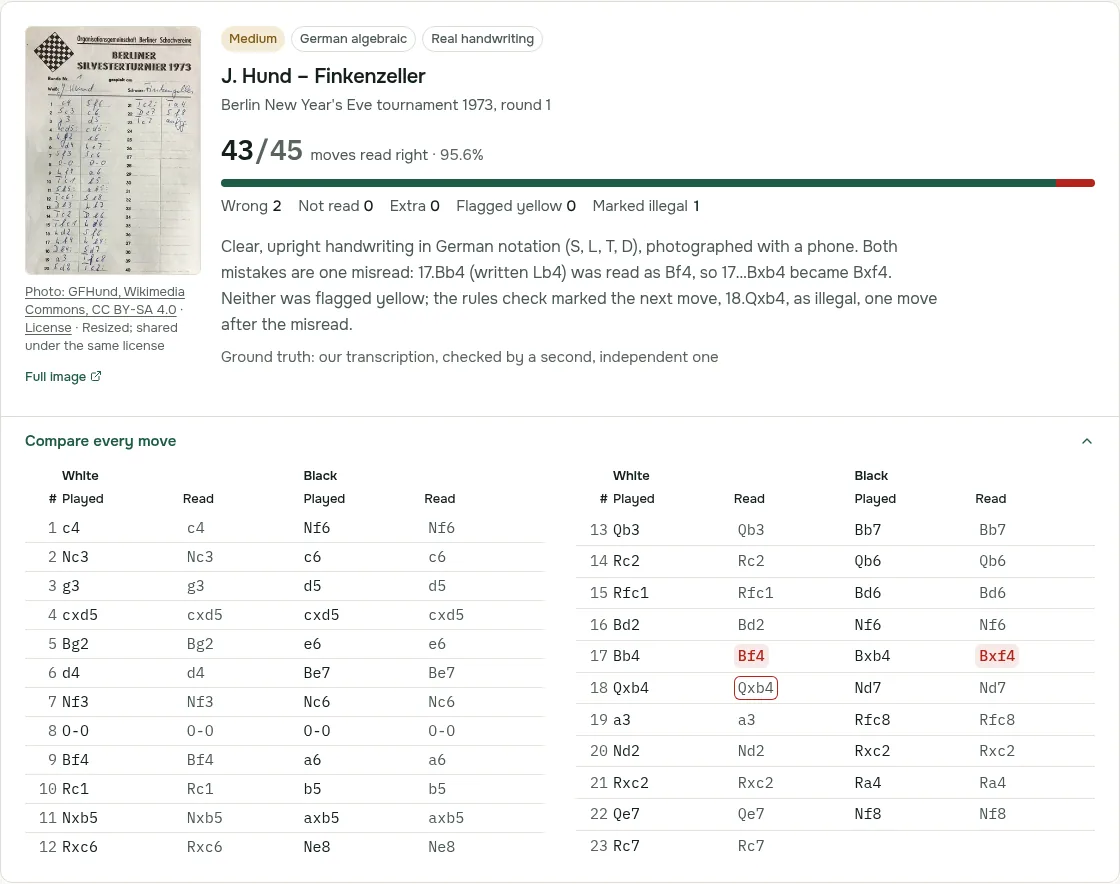

To analyze chess games recorded on physical scoresheets, players need a disciplined, repeatable post-game routine. Analyzing your own over-the-board (OTB) games delivers far higher rating returns than passively watching master games because it directly confronts your personal calculation habits, tactical blind spots, and clock management under tournament conditions.
A complete game analysis workflow moves through five distinct phases:
| Phase | Core Objective | Key Tools & Actions | Recommended Time |
|---|---|---|---|
| 1. Digitize to PGN | Convert paper notation into digital SAN | ScanChess or manual editor | 1–3 min (scan) |
| 2. Reconcile & Validate | Fix illegible plies, time scrambles & clock notes | Duplicate carbon sheet, PGN validator | 3–5 min |
| 3. Unassisted Self-Review | Reconstruct in-game thinking without an engine | Notes, candidate moves, turning points | 15–20 min |
| 4. Engine Verification | Compare subjective notes against Stockfish | Lichess, Chess.com, or game analysis | 10–15 min |
| 5. Structured Error Logging | Categorize blunders and root causes | Systematic spreadsheet or training journal | 5 min |
1. Digitize the Scoresheet to PGN
Physical scoresheets cannot be filtered, branched into alternative variations, or processed by chess engines. The first requirement is converting the paper record into Portable Game Notation (PGN), the universal standard for chess movetext and metadata. (If you are unfamiliar with the tag roster or syntax, our guide on what is PGN outlines the standard specifications.)
You have two practical options to digitize a sheet:
- Manual entry: Type each move pair into an on-screen board or PGN text editor. While workable for short games, manually typing 40 to 60 moves per game is tedious and vulnerable to transcription errors.
- Automated scanning: Photograph the scoresheet and upload it to ScanChess. The AI vision engine transcribes handwriting into Standard Algebraic Notation (SAN), validates move legality against an internal chess board, and exports a clean
.pgnfile. A complete step-by-step walkthrough is available in convert handwritten scoresheet to PGN.
2. Reconcile Scoresheet Gaps and Validate Move Legality
Before importing your PGN into an analysis engine, verify that the digitized movetext accurately reflects the game and complies with strict PGN standards. Third-party analysis tools parse moves strictly from move 1; a single illegal ply, impossible destination square, or missing disambiguation character will cause platforms like Lichess and Chess.com to halt parsing or reject the entire file.
Cross-Check Carbon Copies After Time Scrambles
Under tournament time controls—especially under FIDE Laws of Chess Article 8.4 and 8.5 when a player has under five minutes without adequate increment—players frequently stop recording moves or scribble indecipherable ticks.
- Consult the duplicate copy: If your original scoresheet is smudged, torn, or faded, examine the carbonless NCR duplicate (the bottom copy) or compare notations with your opponent immediately after the round to reconstruct missing moves.
- Learn standard layout rules: If you are deciphering unfamiliar shorthand or symbols, how to read a chess scoresheet explains common column arrangements and scorebook conventions.
Fix Common Notation Traps
- Ambiguous piece moves: Handwritten notation often drops piece disambiguation. Writing
Nd2when knights on b1 and f3 can both reach d2 creates an invalid move. You must specify the departure file or rank (Nbd2). - Castling syntax errors: Writing numeric zeros
0-0instead of standard capital lettersO-Ocauses strict PGN parsers to fail. - Skipped lines: Accidentally writing a Black move in White's column desynchronizes the entire remainder of the game.
Record Clock Times in PGN Comments
Tournament players frequently jot down remaining clock times in the margins (e.g., at moves 20, 30, and 35). Preserving these in PGN move comments (such as 24. Qb3 { [%clk 0:01:45] }) is essential. A tactical blunder committed with 90 seconds left on the clock requires a clock-management correction, whereas the same mistake played with 20 minutes remaining points to a calculation deficiency.
Use our free PGN validator to confirm your file parses cleanly, or inspect the move sequence on the PGN viewer before proceeding.
Worked Example: Validating and Analyzing the Opera Game
To test this validation and analysis process, we tested with a demo scoresheet of the 1858 Opera Game that we filled in ourselves (Paul Morphy vs Duke Karl of Brunswick and Count Isouard).
Checking the Sheet Against Legality
Before importing into an analysis engine, handwritten scoresheets must be checked for ambiguous or impossible moves. On our demo sheet, three handwriting issues tested parser behavior:
- Move 7 (
7... Qe1misread): The move7... Qe7was written with almost no top bar on the digit 7, reading literally as7... Qe1. Queen to e1 is an illegal move in that position.- When we tested this in the free PGN validator, it flagged "Illegal move at 7... Qe1", noted that "13 moves were legal before this one", provided a "LEGAL MOVES HERE" list including
Qe7, displayed the board and FEN where playback stopped, and noted that "4 moves after the error were not checked". - When imported into lichess.org/analysis, Lichess refused to load the game, halted at the starting position, and displayed: "PGN error: Can't play Qe1 at move 7, ply 14".
- When we tested this in the free PGN validator, it flagged "Illegal move at 7... Qe1", noted that "13 moves were legal before this one", provided a "LEGAL MOVES HERE" list including
- Move 9 (
9... 65misread): Black's move9... b5was written with a short-stemmedb, reading as65. Testing this in the PGN validator produced "Illegal move at 9... 65", and the legal candidate list correctly includedb5. - Move 14 (struck-through correction): At move 14, the scoresheet writer originally wrote "Rd8", drew a single clean line through it, and wrote "Rd1" beside it. Whoever transcribes the sheet, person or scanner, has to skip the struck-through
Rd8. Here legality helps: no white rook can reach d8 at move 14, so14. Rd8is illegal and onlyRd1fits.
Once these corrections were made, the full Opera Game PGN verified cleanly:
[Event "Paris Opera House"]
[Site "Paris FRA"]
[Date "1858.??.??"]
[Round "?"]
[White "Morphy, Paul"]
[Black "Duke Karl of Brunswick and Count Isouard"]
[Result "1-0"]

1. e4 e5 2. Nf3 d6 3. d4 Bg4 4. dxe5 Bxf3 5. Qxf3 dxe5 6. Bc4 Nf6 7. Qb3 Qe7 8. Nc3 c6 9. Bg5 b5 10. Nxb5 cxb5 11. Bxb5+ Nbd7 12. O-O-O Rd8 13. Rxd7 Rxd7 14. Rd1 Qe6 15. Bxd7+ Nxd7 16. Qb8+ Nxb8 17. Rd8# 1-0
Analyzing the Key Tactical Positions
Replaying the verified game reveals White's continuous pressure and rapid piece coordination:
Key Position 1: Disambiguation at Move 11 (11... Nbd7)
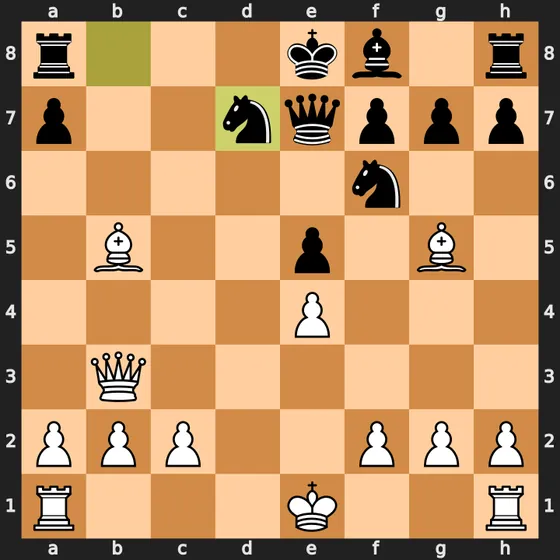
Following White's piece sacrifice with 10. Nxb5 cxb5 11. Bxb5+, Black's king is placed in check. Black must interpose a knight on d7, but both the knight on b8 and the knight on f6 have access to d7. Under SAN rules, specifying the departure file (11... Nbd7) is necessary to distinguish which piece moved. The knight on d7 is already pinned to the king by the bishop on b5. White then castles queenside (12. O-O-O), bringing a rook to d1 to attack the pinned knight.
Key Position 2: The Queen Sacrifice (16. Qb8+)
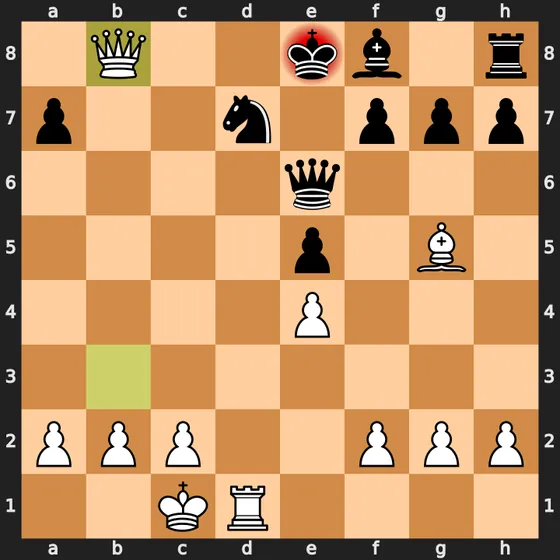
After 15. Bxd7+ Nxd7, White plays 16. Qb8+, giving up the queen. python-chess confirms that Black has exactly one legal reply, 16... Nxb8. Taking the queen pulls the knight off d7, and with it the last black piece guarding d8.
Key Position 3: Checkmate on the Back Rank (17. Rd8#)
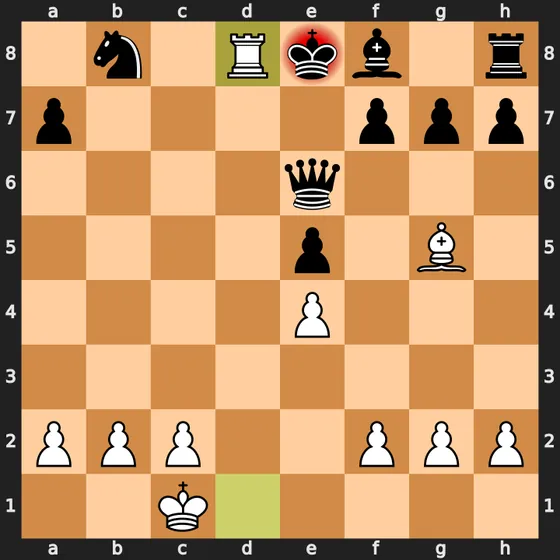
With the black knight pulled away to b8, White plays 17. Rd8#. White's remaining rook goes to d8 with check. The bishop on g5 protects d8 and also covers e7, the king's own bishop blocks f8, and no black piece can take the rook, so it is mate.
3. Import the PGN into an Analysis Board
Once you have a clean, verified PGN, import it into your preferred analysis workspace:
- Lichess Analysis Board: Open lichess.org/analysis and paste your PGN into the input field below the board to load an interactive scratchpad. Alternatively, use lichess.org/paste to generate a permanent game link with server-side computer analysis. (See our detailed guide on how to import PGN to Lichess for configuration steps.)
- Chess.com Analysis: Open chess.com/analysis, select Load PGN, paste the movetext, and press Load. Note that menu labels and navigation may adjust across site updates.
- Local GUIs and Tools: Software like SCID, native engines, or our browser-based game analysis tool allow you to review positions offline.
4. Perform Unassisted Self-Analysis First
The most common mistake when analyzing chess games is turning on the engine immediately. When an engine displays +2.8 or labels a move as a blunder, your brain adopts the engine's verdict passively without understanding why you chose the move during the game.
Step through the game on the board with the engine turned off:
- Reconstruct your candidate moves: At critical junctures, record what moves you calculated at the board and why you rejected the alternatives.
- Note your psychological state: Did you feel in control, confused, or intimidated by your opponent's rating or position?
- Flag perceived turning points: Identify the exact move where you felt the balance shifted from comfortable to defensive, or from equal to winning.
- Annotate your tactical calculations: Write text comments and sub-variations in your PGN detailing what lines you calculated.
Training your own evaluation mechanism before consulting an engine is the only way to build reliable over-the-board intuition.
5. Verify Critical Turning Points with the Engine
Once your self-review notes are complete, toggle on Stockfish to evaluate the game objectively:
- Diagnose major swings, not engine noise: Ignore minor evaluation fluctuations of 0.2 to 0.4 pawns. As a rule of thumb, focus on moments where the evaluation swings by 1.5 pawns or more—points where you turned a winning position into a draw, or allowed a counterattack.
- Examine missed tactics: Check whether your opponent gave you tactical opportunities you overlooked. You can run missed tactics to pinpoint these calculation gaps.
- Compare subjective impressions with engine reality: When you thought you were completely winning but the engine rates the position as
0.00, identify what defensive resource or counterplay you failed to see. For a single position from the finished game, the best move finder shows Stockfish's top three lines from a pasted FEN.
6. Maintain a Structured Error Log
A single reviewed game provides temporary insight; maintaining a systematic error log across dozens of games exposes recurring systemic weaknesses.
Do not settle for vague one-line notes. Record each major error in a structured spreadsheet or notebook using standard fields:
| Game & Position (FEN) | Move & NAG | Clock Remaining | Eval Swing (Stockfish) | In-Game Rationale (Subjective) | Engine Refutation & Best Move | Root Cause Category |
|---|---|---|---|---|---|---|
| [FEN] | [your move] ($2) | [clock] | [eval before] → [eval after] | [what you thought] | [engine's suggestion] | [root cause category] |
How to fill each column: Record the position FEN, your move with its NAG annotation, your remaining clock time, the engine evaluation before and after the move, your subjective in-game rationale, the engine's suggested move and refutation, and the root cause category.
Review your error log monthly. If the majority of your logged blunders cluster in time trouble, your primary training priority should be clock management and calculation discipline rather than memorizing new opening lines.
Review Your Openings and Archive Games
Once your games are digitized and logged, compile them into an opening database. Cross-reference where you consistently leave theoretical preparation, which pawn structures cause you discomfort, and how your results vary between White and Black. If a scoresheet has no opening name on it, the chess opening identifier reads the moves and gives the name and ECO code to file it under. For your online games, Chess Wrapped sums up a year on Chess.com or Lichess, favorite openings included.
To keep a multi-round tournament or season organized without losing physical sheets, see our guide on how to archive chess scoresheets.
Before your next tournament round, take the paper scoresheet from your last game, photograph it, and upload it to the ScanChess scanner. A scan costs 2 credits (new accounts start with 10 free credits), and catching illegal or ambiguous notation before exporting ensures your PGN loads cleanly on any platform. Once the digitized game is on your analysis board, the highest rating returns come from studying your own decisions before letting the engine speak.