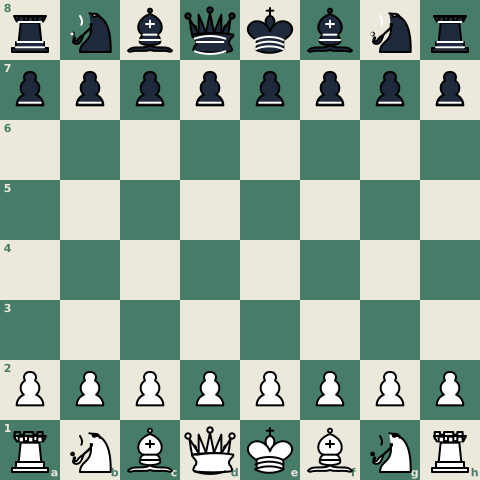

rnbqkbnr/pppppppp/8/8/8/8/PPPPPPPP/RNBQKBNR w KQkq - 0 1 is the standard starting position of a chess game, written in the single line of text that every engine, analysis tool, and puzzle database understands. That line is FEN (Forsyth-Edwards Notation). Where PGN records an entire game move by move from start to finish, FEN captures a single position at one exact moment in time, packing all the information needed to restart the game into six space-separated fields.
Devised originally by Scottish newspaper journalist David Forsyth in the 19th century and later adapted for computer chess by Steven J. Edwards in the 1994 Portable Game Notation (PGN) specification, FEN is the universal standard for sharing board positions. You rarely need to type one by hand: chess board image to FEN covers reading the string straight from a screenshot, diagram or photo of a board.
The Six Fields of a FEN String
A FEN string consists of exactly six fields separated by single spaces. Each field answers a specific question about the position: piece locations, whose turn it is, castling eligibility, en passant availability, and the move clocks.
If you want to inspect or test a string while reading, you can paste any FEN into the free board editor to view and adjust the position visually in your browser.
rnbqkbnr/pppppppp/8/8/8/8/PPPPPPPP/RNBQKBNR w KQkq - 0 1
Reading from left to right, here is what each field describes:
| # | Field | Starting Example | What It Describes | Standard Format |
|---|---|---|---|---|
| 1 | Piece placement | rnbqkbnr/.../RNBQKBNR | Square-by-square piece layout from rank 8 to rank 1 | 8 rank segments separated by / |
| 2 | Active color | w | Whose turn it is to move | w (White) or b (Black) |
| 3 | Castling availability | KQkq | Which castling rights remain unbroken | K, Q, k, q, or - if none |
| 4 | En passant target square | - | Target square behind a pawn that just moved two squares | Algebraic square (e.g. e3) or - |
| 5 | Halfmove clock | 0 | Halfmoves (plies) since last pawn move or capture | Non-negative integer (draw at 100) |
| 6 | Fullmove number | 1 | Total move count of the game | Positive integer starting at 1 |
1. Piece Placement
This is the longest and most important field. It describes the 64 squares of the board rank by rank, starting from rank 8 (Black's back rank) down to rank 1 (White's back rank), with a forward slash (/) separating adjacent ranks.
Pieces are identified using their standard single-letter English abbreviations:
- Uppercase letters = White pieces:
K(king),Q(queen),R(rook),B(bishop),N(knight),P(pawn). - Lowercase letters = Black pieces:
k(king),q(queen),r(rook),b(bishop),n(knight),p(pawn).
Consecutive empty squares are compressed into digits from 1 to 8. For example, 8 denotes an entirely empty rank, while 4P3 represents four empty squares, a white pawn, and three empty squares. Each rank segment must sum to exactly eight squares. Because the string always starts from Black's back rank, a diagram printed from Black's side is easy to type in upside down; flip the FEN rather than retyping it.
In the starting position, rank 8 is rnbqkbnr, rank 7 is pppppppp, ranks 6 through 3 are each 8, rank 2 is PPPPPPPP, and rank 1 is RNBQKBNR. If you are unsure why the queen's letter comes fourth on both ranks, how to set up a chess board places every piece square by square.
2. Active Color
A single letter indicates whose turn it is to move: w for White, b for Black. Because chess engines evaluate threats and calculate candidate moves based on who moves next, the same arrangement of pieces is a fundamentally different position depending on who has the move.
3. Castling Availability
This field specifies which castling rights remain legally available to each side:
K: White may castle kingside (short castling)Q: White may castle queenside (long castling)k: Black may castle kingsideq: Black may castle queenside
KQkq indicates that all four rights are intact. If a king or rook moves, or if a rook is captured on its starting square, the corresponding letter is removed. When neither side retains any castling rights, the field is written as a single hyphen: -.
4. En Passant Target Square
According to section 16.1.3.4 of the PGN specification, the en passant target square is recorded whenever the preceding move was a pawn advancing two squares, naming the square the pawn passed over.
Crucially, the target square is recorded regardless of whether an opposing pawn is in position to execute an en passant capture. For instance, immediately after White plays 1.e4 on the opening move, the e-pawn has made a two-square advance over e3. Field 4 becomes e3, even though Black has no pawn on d4 or f4 capable of capturing it. If the previous move was not a two-square pawn advance, this field is set to -.
5. Halfmove Clock
This counts the number of halfmoves (individual plies by either player) since the last pawn advance or piece capture. It exists to track the fifty-move rule: if the halfmove clock reaches 100 (50 full moves without a capture or pawn advance), either player may claim a draw. The counter resets to 0 whenever a pawn moves or any piece is captured.
6. Fullmove Number
The fullmove counter starts at 1 and increments by one immediately after Black makes a move. For example, White plays move 1, Black responds with move 1, and the counter increments to 2 for White's second move.
A Second Example: The Position After 1.e4
Examining how a FEN string updates after an opening move illustrates how the fields work together. Here is the position immediately after White plays 1.e4:
rnbqkbnr/pppppppp/8/8/4P3/8/PPPP1PPP/RNBQKBNR b KQkq e3 0 1
Notice the specific updates compared to the starting FEN:
- Piece placement: Rank 4 changes from
8to4P3(the advanced e-pawn flanked by empty squares), and White's pawn rank changes fromPPPPPPPPtoPPPP1PPPwhere the e2 square was vacated. - Active color: Flips from
wtobbecause it is Black's turn. - Castling availability: Remains
KQkqbecause neither king nor rook moved. - En passant target square: Changes from
-toe3, the square the pawn skipped over during its two-square advance. - Halfmove clock: Stays at
0because a pawn move resets the clock. - Fullmove number: Remains
1because Black has not yet completed move 1.
How to Tell If a FEN Is Checkmate or Stalemate
A FEN string never contains an explicit label for "check", "checkmate", or "stalemate". Game status is derived entirely from piece geometry and the active color.
To determine whether a position is checkmate or stalemate from a FEN string:
- Identify the defending king: Read the active color in field 2. If it is
w, locate the white king (K); ifb, locate the black king (k). - Determine if the king is attacked: Check whether any enemy piece attacks the defending king's square. If no opposing piece attacks the king, the position cannot be checkmate.
- Check for legal replies: If the king is under attack, determine whether the defending side has any legal moves to escape:
- Moving the king to an unattacked square.
- Capturing the checking piece.
- Interposing a friendly piece along the line of attack (impossible against knight attacks or adjacent attackers).
- If the king is in check and the side to move has zero legal moves, the position is checkmate.
- If the king is not in check and the side to move has zero legal moves, the position is stalemate (a draw).
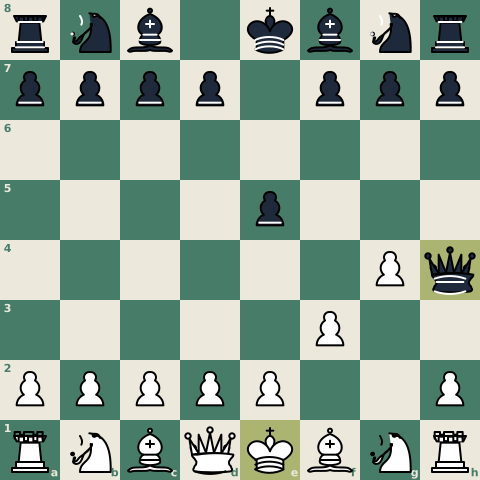
Here is the fastest checkmate in chess, Fool's Mate, after 1.f3 e5 2.g4 Qh4#:
rnb1kbnr/pppp1ppp/8/4p3/6Pq/5P2/PPPPP2P/RNBQKBNR w KQkq - 1 3
In this FEN:
- The active color is
w, focusing on White's king on e1. - The black queen on h4 attacks e1 along the open diagonal through g3 and f2.
- The white king has no escape squares: d1, d2, e2, and f1 are occupied by White's own pieces, and f2 is covered by the black queen.
- No white piece can capture the queen on h4, and no piece can move to g3 or f2 to block the check.
- White has zero legal moves while in check, confirming checkmate.
Verifying complex positions by eye is error-prone. The free board editor parses FEN strings in the browser, confirms whether the position is playable, and flags check, checkmate, and stalemate states automatically.
Common Illegal FEN Errors and Engine Rejections
When importing a FEN into engines like Stockfish or analysis interfaces, an invalid string will cause errors or rejections. The most common illegal FEN issues include:
| Error Type | What Goes Wrong | Example Symptom | Why Engines Reject It |
|---|---|---|---|
| Rank count mismatch | Missing or extra / delimiter | rnbqkbnr/pppppppp/8/8/8/PPPPPPPP/RNBQKBNR w ... (only 7 ranks) | A standard board must contain exactly 8 ranks. |
| Square sum mismatch | Miscounted empty squares or typos | 4P4 on a single rank (sums to 9 squares) | Every rank separated by / must total exactly 8 squares. |
| Pawn on back ranks | Pawns placed on rank 1 or rank 8 | P7/8/8/8/8/8/8/8 w - - 0 1 | Pawns cannot exist on rank 1 or 8; reaching the 8th rank requires promotion. |
| Invalid king counts | Missing kings or duplicate kings | Two white kings (K) or zero black kings (k) | Standard chess requires exactly one king per player. |
| Inactive king in check | Side not to move is left under attack | Active color is w, but Black's king on e8 is attacked by White's rook | A player cannot make a move that leaves their own king in check. |
| Invalid en passant square | En passant square listed on an impossible rank | En passant square given as e4 or e5 | An en passant square can only sit on rank 3 (after a White push) or rank 6 (after a Black push). |
To test a string against every row of this table at once, paste it into the FEN validator: it names each error it finds and says how to fix it.
Chess960 Variants: Shredder-FEN and X-FEN
In standard chess, the kings and rooks always begin on predictable home squares (e1, a1, h1 for White; e8, a8, h8 for Black). The four castling availability characters KQkq uniquely identify kingside and queenside castling rights.
In Chess960 (Fischer Random Chess), the back-rank pieces are shuffled into one of 960 starting configurations. Rooks may begin on interior files, or both rooks may sit on the same side of the king. Because standard KQkq cannot distinguish between multiple rooks on the same side or non-standard file positions, two variants handle castling:
- Shredder-FEN: Replaces
K/Qandk/qwith the actual file letters of the castling rooks (uppercase for White, lowercase for Black). For example, if White's rooks start on the c-file and g-file and both retain castling rights, the castling field is written asCGcg. - X-FEN: Retains standard
KQkqnotation whenever the castling rooks are unambiguous (such as rooks on opposite sides of the king), but replaces the character with the rook's starting file letter if ambiguity exists.
Modern chess software and engines support both variants alongside standard FEN to ensure Fischer Random positions load accurately.
FEN vs. PGN: When to Use Each Format
FEN and PGN are both standard plain-text formats, but they serve different purposes:
- FEN is a single-frame snapshot. It records one exact board state without previous move history (other than the halfmove and fullmove counts). It is compact, fits on a single line, and is the standard format for puzzle setups, endgame studies, and engine evaluation baselines.
- PGN (Portable Game Notation) is a full-game chronicle. It records metadata tags (players, event, date, result) followed by the entire move sequence written in algebraic notation.
The two formats work together. When a game begins from a non-standard position—such as a puzzle, handicap match, or tactical exercise—a PGN file includes [SetUp "1"] and [FEN "..."] tags in its header so software sets up the correct board before replaying the moves. The FEN to PGN converter writes those two tags for you, and PGN to FEN goes the other way, giving the FEN after any move of a game.
Where FEN Is Used in Practice
Because FEN is universal plain text, it connects chess tools across platforms:
- Tactics and Puzzles: Tactical training platforms store puzzles as FEN positions paired with expected move sequences.
- Engine Analysis: Desktop GUIs, Lichess, and Chess.com allow you to paste a FEN string directly into their analysis boards to evaluate specific positions with Stockfish. You can also paste any FEN into Game Analysis to evaluate variations locally, or onto the free chess analysis board to try your own lines from that position.
- Board Diagrams and Media: Generating high-resolution images of a board position for articles, printouts, or sharing is simple when you pass a FEN to FEN to Image.- Study and Coaching: Coaches and players paste FEN strings into chats and study groups to share specific endgame or opening dilemmas without typing out move lists.