
Building a collaborative Lichess study from handwritten scoresheets requires a four-part pipeline: digitizing the physical sheets into validated PGN notation, structuring a study container on Lichess, importing each game into its own dedicated chapter, and enriching critical moments with arrows, coaching comments, and interactive guess-the-move exercises. Converting the paper sheets through ScanChess eliminates manual typing mistakes and flags illegal moves before import, providing coaches and club players with a cloud-synced, interactive coaching workbook from weekend tournaments in minutes.
| Stage | Action | Output / Destination | Key Pitfall to Avoid |
|---|---|---|---|
| 1. Digitize & Verify | Photograph scoresheet and verify flagged moves | Clean PGN with standard SAN | Retaining ambiguous moves (e.g., Nd7 instead of Nbd7), which break PGN parsers |
| 2. Study Architecture | Create study container and assign access permissions | Lichess Study (Learn → Study) | Cramming an entire multi-month season into one study rather than modular event containers |
| 3. Chapter Import | Paste or upload PGN into chapter creation modal | One chapter per game | Pasting multiple games into lichess.org/paste instead of the Study Chapter PGN tab |
| 4. Annotate & Train | Add visual arrows, NAG glyphs, and interactive questions | Annotated game or Interactive Lesson | Flooding chapters with engine evaluations rather than explaining critical decision nodes |
| 5. Share & Sync | Send unlisted study link and toggle real-time sync | Interactive web URL | Leaving study write permissions open to students during live demonstrations |
What You Will Need
- The physical paper scoresheets from your tournament or club match.
- A smartphone or camera to capture clear photos of each sheet.
- A free ScanChess account to recognize handwriting and export validated PGN files (image recognition requires signing in; new accounts receive 10 free credits, and each scoresheet scan costs 2 credits).
- A free Lichess account to create studies, manage chapters, and share interactive links.
Step 1: Digitize the Scoresheet into Validated PGN
Paper scoresheets filled out under tournament time controls frequently contain notation defects that break digital parsers. Common issues include omitted disambiguation files (writing Nd7 when two knights can jump to d7), castling written with numeric zeros (0-0) instead of uppercase letters (O-O), or illegal moves written in time pressure.
To digitize your games without tedious manual typing:
- Photograph each sheet flat and evenly lit, keeping all four corners in frame. The photo checklist in how to get a clean scan of a chess scoresheet helps avoid shadow and angle distortions.
- Upload the images to ScanChess. The AI recognizer parses the handwriting and validates every ply against chess rules on an internal board.
- Review the flagged moves. The interface marks illegal plies in red and uncertain readings in amber, displaying legal candidate moves for rapid one-click correction.
- Replay the game once on the interactive board to verify the final position matches the result, then export the clean
.pgnfile. For a detailed review walkthrough, see convert a handwritten scoresheet to PGN; to understand header tags and formatting standards, consult what is PGN.
If you are batching several games together, verify the combined file in our free PGN validator before uploading to ensure no syntax errors persist.
Example: Resolving Notation Errors into Clean SAN
To see how Lichess handles misreads and foreign notation, we tested on 2026-09-30 with a demo scoresheet of the 1858 Opera Game (Paul Morphy vs Duke Karl of Brunswick and Count Isouard) that we filled in ourselves.
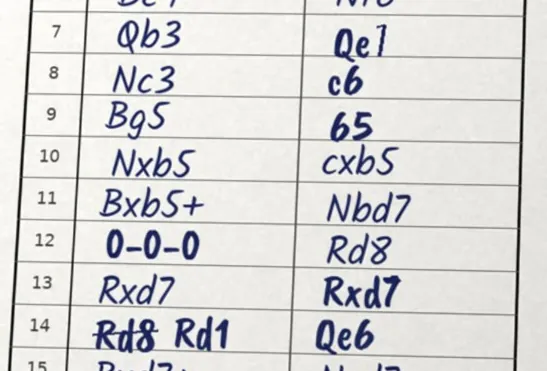
Our demo sheet included deliberate handwriting anomalies to test parser behavior:
- Move 7 (
7... Qe1): Black's move7... Qe7was written with almost no top bar on the digit 7, reading as7... Qe1. When pasted into Lichess analysis (lichess.org/analysis), Lichess halted at the start and gave an explicit error message:"PGN error: Can't play Qe1 at move 7, ply 14". - Move 9 (
9... 65): Black's9... b5was written with a short-stemmedb, reading as65(an impossible move token). - Move 12 (
12. 0-0-0): White's castling was written with numeric zeros0-0-0. In our testing, Lichess successfully parsed0-0-0across all 33 plies. - Move 14 (struck-through correction): The writer first wrote
Rd8, struck it through with a single line, and wroteRd1beside it.
Foreign Piece Letters Fail One Move Late on Lichess
We also tested how Lichess handles scoresheets written in national piece letters, using raw moves from a 1973 German scoresheet (1. c4 Sf6 2. Sc3 c6 ...). Lichess failed with: "PGN error: Can't play c3 at move 2, ply 3". Lichess did not complain about Sf6 at move 1. The error names c3, which suggests it read 1... Sf6 as the pawn move f6 and then 2. Sc3 as an impossible pawn push to c3. Untranslated foreign piece letters can therefore cause Lichess to report an error one move later than the actual mistake.
Importing the Clean PGN
Once the handwriting defects on our demo sheet were corrected and verified with python-chess, we assembled the full clean PGN:
[Event "Paris Opera House"]
[Site "Paris FRA"]
[Date "1858.??.??"]
[Round "?"]
[White "Morphy, Paul"]
[Black "Duke Karl of Brunswick and Count Isouard"]
[Result "1-0"]

1. e4 e5 2. Nf3 d6 3. d4 Bg4 4. dxe5 Bxf3 5. Qxf3 dxe5 6. Bc4 Nf6 7. Qb3 Qe7 8. Nc3 c6 9. Bg5 b5 10. Nxb5 cxb5 11. Bxb5+ Nbd7 12. O-O-O Rd8 13. Rxd7 Rxd7 14. Rd1 Qe6 15. Bxd7+ Nxd7 16. Qb8+ Nxb8 17. Rd8# 1-0
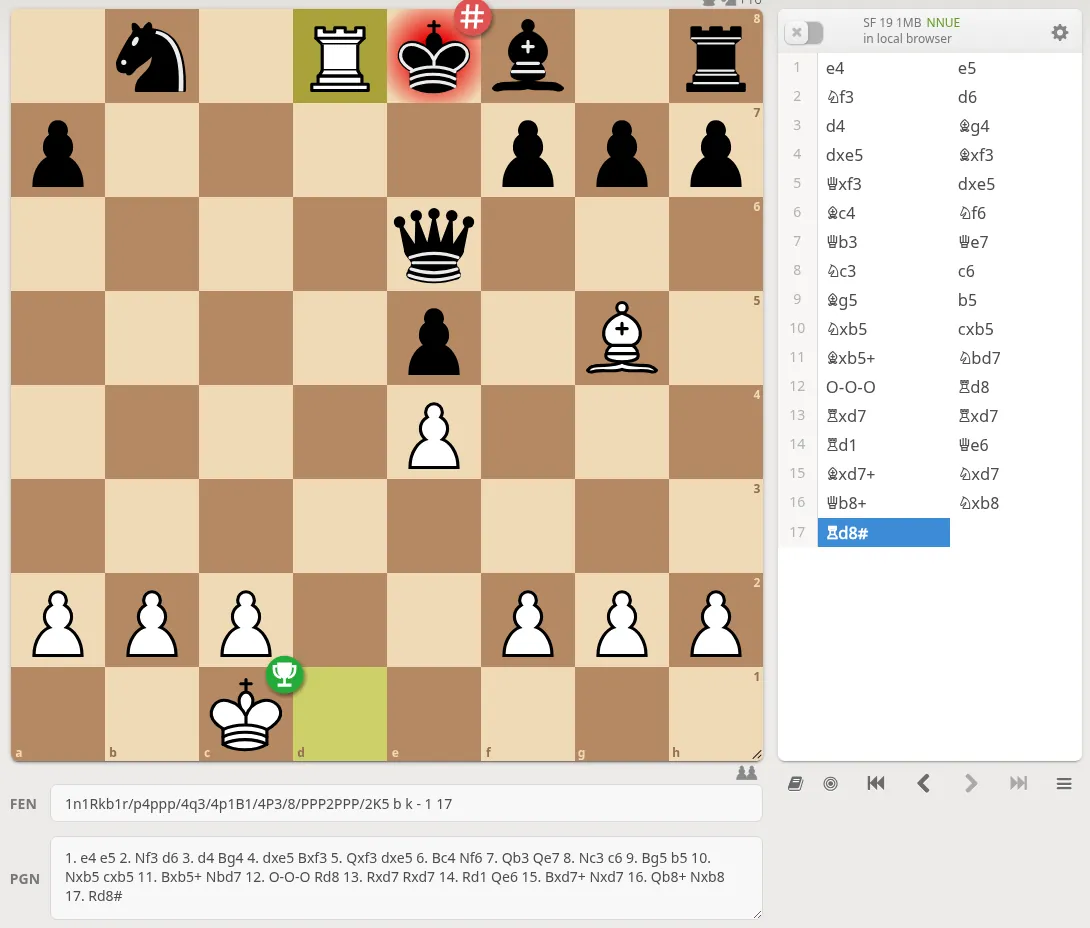
When imported into Lichess, this clean PGN loaded all 33 plies immediately, jumping straight to the final checkmate position on move 17:
Step 2: Create and Structure the Study
Log in to Lichess, navigate to Learn → Study (or Community → Studies; note that menu labels may shift across site updates), and click the green + button to create a new study.
When configuring your study container, consider two architectural decisions:
Chapter Organization and Container Sizing
While it is tempting to dump an entire squad's season into a single study, platform chapter limits and browser performance make modular organization superior. Instead of creating a monolithic container that risks hitting platform chapter caps, divide studies logically:
- By Event: "2026 Spring Open — U1800 Section" (one chapter per round).
- By Student: "Alex Tan — 2026 Tournament Review" (one study per coaching term).
- By Theme: "Tactical Turning Points from Weekend League Play".
Visibility and Collaboration Roles
- Visibility: Keep the study Private while importing and annotating. Switch to Unlisted when sharing with a student or squad so only people with the URL can access it without appearing in public search indexes. Use Public only for public opening guides or club game archives.
- Member Permissions: When adding students as members, set their role to Read-only if you want them to review your notes and solve interactive exercises without accidentally modifying moves or deleting variations. Set them as Contributor only when conducting collaborative analysis where both parties write notes.
Step 3: Import Each Game as a Chapter
Inside your study, click Add a new chapter, select the PGN tab, and paste your exported PGN text (or browse to upload the .pgn file). Click Create chapter.
Follow these practices to maintain a clean study:
- One game per chapter: Do not paste several games into an existing chapter as sub-variations. When you paste a multi-game PGN into the chapter import modal, Lichess automatically splits each game into its own dedicated chapter.
- Clear chapter titles: Avoid generic titles like "Chapter 1". Label each chapter with player names, round, and opening (for example,
R3: Davies vs Tan (Sicilian Najdorf)). This turns the chapter list into an actionable table of contents. - Single vs. multi-game behavior: Pasting into
lichess.org/pasteimports only the first game and silently drops subsequent ones. Using the Study Chapter PGN tab parses all games in your file into distinct chapters. The mechanics of handling rejected moves are covered in import PGN to Lichess.
Step 4: Annotate, Highlight, and Build Interactive Exercises
A study bridges raw game logs into structured instruction. Rather than copying engine evaluation numbers, focus your annotations on practical decision points where the game shifted:
- Board Visualizations: Right-click and drag on the board to draw green arrows showing attacking lines or tactical threats (Shift, Alt, or Ctrl modifiers draw red, blue, and yellow arrows). Right-click a square to highlight it, pinpointing weak pawns or critical outpost squares.
- Move Assessment Glyphs: Attach standard evaluation symbols (
!,?,!?,??) to mark critical choices. Lichess stores these as Numeric Annotation Glyphs (NAGs) in the underlying PGN. Our guide to chess symbols and annotations details how these symbols are encoded and interpreted. - Branching Variations: Add alternate candidate moves to illustrate missed tactical combinations or defensive resources ("If 12...bxc3 13. Bb5+"). Keep sidelines short (2–4 plies) so the core lesson remains sharp.
Turning Mistakes into Interactive Lessons
For coaching and self-study, turn critical blunder positions into active puzzle exercises:
- Open the chapter settings (the gear icon beside the chapter title).
- Change the Analysis mode from Normal analysis to Interactive lesson (labels may vary slightly across updates).
- Navigate to the turning point (such as move 16 in the Opera Game above). In the move comment box, provide a prompt for the student (for example: "White can force checkmate in two moves. Find the queen sacrifice that deflects Black's knight!").
- Enter the winning move (
16. Qb8+!). Lichess marks this as the required solution and prompts the student to guess the move when they open the chapter. - Add text feedback to the wrong moves a student is likely to try.
This interactive format forces students to calculate and solve their own real-board mistakes instead of passively reading annotations. You can drill similar recurring tactical patterns with our free missed tactics tool.
Step 5: Conduct Live Lessons and Share the Study
When your annotations and exercises are ready, share the study:
- Set the study visibility to Unlisted or Public.
- Copy the URL from the browser address bar or the study share menu.
- Send the link to your student, team chat, or coaching group. Anyone with the link can open the study on any desktop or mobile browser with zero software installation.
Real-Time Board Synchronization
During live coaching sessions, enable Sync (the lock icon beneath the move list):
- Sync On: Every viewer's board immediately follows the coach's board position, arrows, and opened variations, turning the study into an interactive whiteboard.
- Sync Off: Students can step forward, explore sidelines independently, or review previous moves without disrupting the coach's screen.
For coaches organizing larger squads or building multi-student training libraries, see Digitize Your Students' Games: ScanChess for Coaches and our structured review framework in how to analyze your chess games from scoresheets. You can also embed individual games on club websites using our PGN viewer (see how to embed an interactive chess board on your website).
Troubleshooting Common Import and Study Issues
| Problem | Root Cause | Solution |
|---|---|---|
| Lichess reports "Invalid PGN" or rejects a move | Illegal move, ambiguous piece notation (e.g., Nbd7 written as Nd7), or malformed syntax on the paper sheet | Open the game in the ScanChess scanner or run the text through our PGN validator to isolate the first invalid ply. Correct the move to match the physical position and re-export. |
| Only the first game loads from a multi-game file | The file was uploaded to lichess.org/paste instead of the Study Chapter modal | lichess.org/paste parses only one game per session. In your study, click Add chapter → PGN to parse multi-game files into individual chapters. |
| Multiple games merge into a single chapter | Missing blank line separators between PGN header tags and movetext | Standard PGN syntax requires a blank line between the tag brackets and the move list, as well as between consecutive games. Ensure each game begins with fresh bracketed tags. |
| Study approaches platform capacity | Attempting to archive an entire season into a single container | Partition your collection into focused studies by tournament, round, or student squad to stay well within platform limits and maintain fast loading times. |
From Paper to Interactive Archive
Transcribing tournament sheets by hand move-by-move introduces typos and exhausts study time before analysis even begins. Scanning scoresheets with ScanChess shifts the manual burden to automated recognition and rule-checked validation. Once exported to PGN, organizing games into a Lichess study turns scattered paper sheets into permanent, interactive coaching assets that students and teammates can learn from anywhere.