Chess Scoresheet Scanner: Handwritten Scoresheets to PGN
Scan handwritten chess scoresheets to PGN: what the scanner does and costs, its limits, and where to find photo tips, notation help and a step-by-step guide.
A chess scoresheet scanner is specialized vision software that turns photographs of handwritten chess scoresheets into Standard Algebraic Notation (SAN) and exportable Portable Game Notation (PGN) files. Instead of manually keying 40 to 60 moves into a database, you photograph the paper sheet, verify any flagged plies against an interactive board, and download a validated PGN. For a step-by-step conversion walkthrough, see Convert a chess scoresheet to PGN.
What it is
ScanChess is a purpose-built recognition tool engineered specifically for over-the-board notation. It extracts move pairs from physical scoresheets, replays them sequentially from the standard starting position using a chess rule engine, and outputs a complete PGN file with Seven Tag Roster metadata.
Dedicated chess scanner vs. general OCR
General document scanners (such as Google Lens or Apple Live Text) treat scoresheets as arbitrary text lines. Because chess notation uses a compact, easily confused character set, general OCR fails on real games:
Dimension
General Document OCR
ScanChess Scoresheet Scanner
Character disambiguation
Confuses b with 6, B with 8, g with 9, 0-0 with O-O
Tracks board state to eliminate impossible characters
Chess rule validation
None; silently accepts impossible moves like 14. Nxf7
Every ply is replayed; illegal moves flag red
Shorthand notation
Leaves abbreviations like ed or dc as raw text
Expands pawn captures (ed → exd4) using board context
Move ambiguities
Emits ambiguous SAN (e.g., Nd7 when two knights can move there)
Flags ply amber and displays legal candidates (Nbd7, Nfd7)
Column desynchronization
A skipped move offsets every following row permanently
Allows inline ply insertion/deletion to resynchronize columns
What it does well: handwriting transcription in practice
Real scoresheets written during tournament play feature hurried penmanship, scratched-out blunders, and shorthand. ScanChess pairs computer vision with a chess engine so that visual ambiguities resolve against legal board geometry. What that achieves on real sheets is published on the scoresheet scan accuracy page, every move included, right or wrong.
Correct via inline pencil tool against zoomable photo
Key capabilities:
Visual error flagging: Illegal readings turn red; low-confidence readings turn amber with legal alternative moves to pick from. Scan chess notation details how this works, and how ScanChess reads unclear moves covers the legal but implausible moves it also flags.
Multi-page games: Double-sided scoresheets or multi-page carbon sheets upload together (up to 10 images, 15 MB each) and merge in sequential order for a single 2-credit fee.
Side-by-side editing: Desktop review displays the zoomable original scoresheet photo alongside the interactive board and move list. Mobile review provides an instant photo/moves toggle.
Full games library: Saved games stay in your account on every device you sign in from, with one-click PGN download or clipboard copy.
Test the scanner with a preloaded sample
You can test the transcription and review workflow without creating an account or spending credits:
Click the sample scoresheet button on the upload screen.
Inspect the side-by-side verification view: examine how flagged plies appear, test the inline move editor, and step through the game on the virtual board.
Preloaded samples run entirely in the browser and never consume credits.
✓Tested by us
What we saw when we tested it
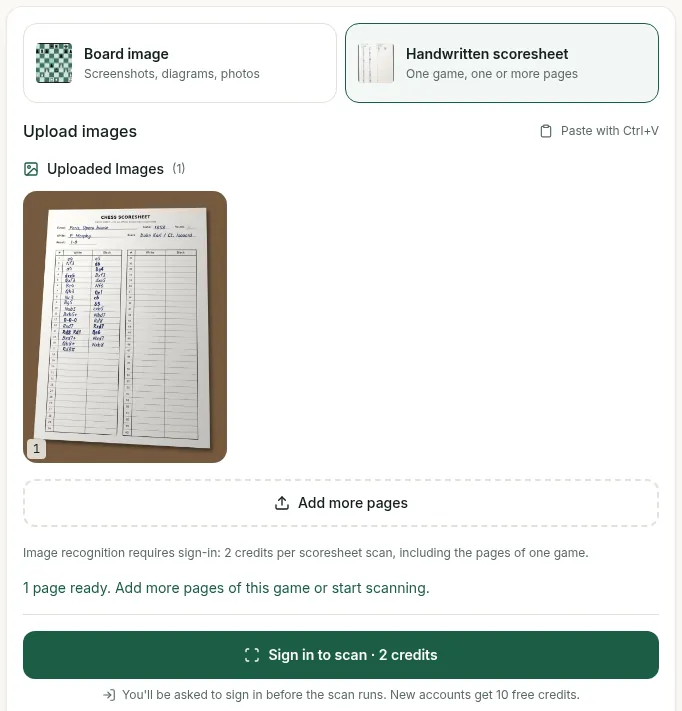
When we tested the scanner signed out on 30 September 2026, uploading an image at /dashboard/scan showed the file preview with "1 page ready". Recognition did not run without an account: the button read "Sign in to scan · 2 credits" and the page stated "Image recognition requires sign-in: 2 credits per scoresheet scan, including the pages of one game." New accounts receive 10 free credits.
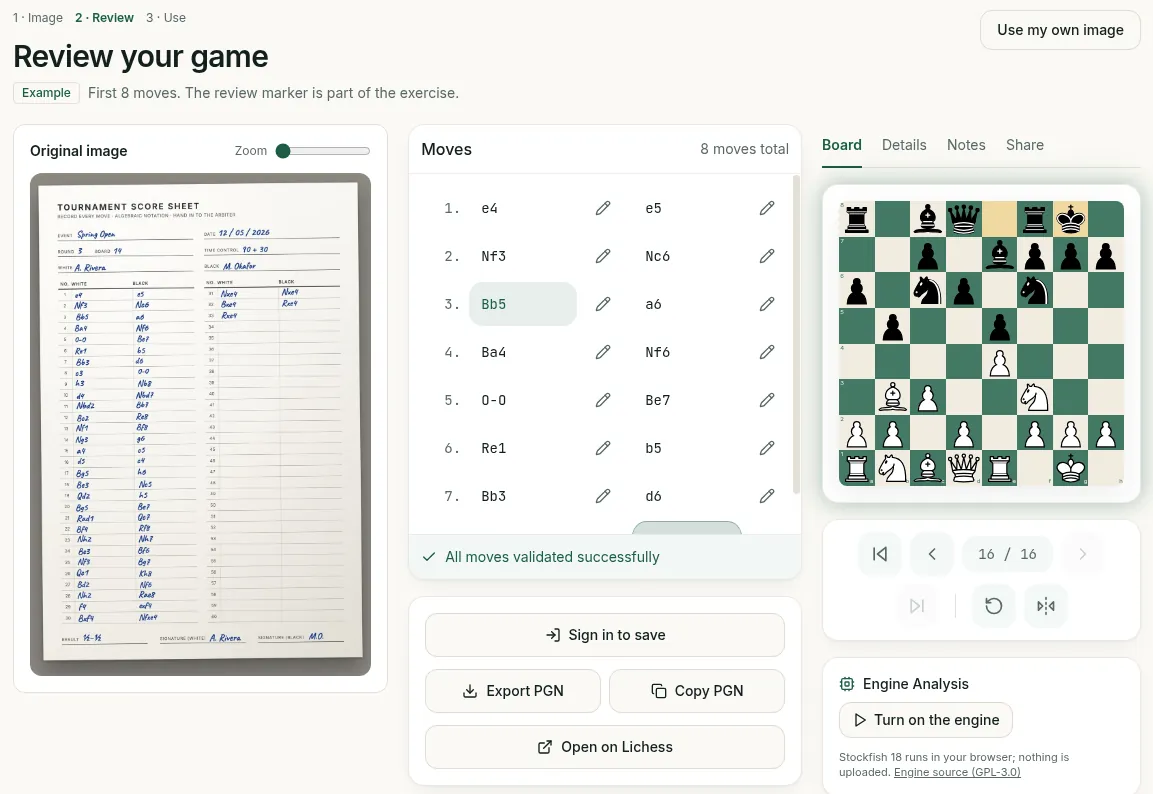
Testing the free preloaded Example required no sign-in or credits. It opened the Review screen showing the original scoresheet photo on the left, the move list in the middle ("8 moves total", "First 8 moves"), and an interactive board on the right with Board, Details, Notes, and Share tabs, confirming "All moves validated successfully". The engine panel showed "Turn on the engine" (Stockfish 18 in the browser), alongside buttons for "Sign in to save", "Export PGN", "Copy PGN", and "Open on Lichess". Clicking the pencil button beside any move opened an inline editor with check and cross buttons, plus "Insert move" and "Delete".
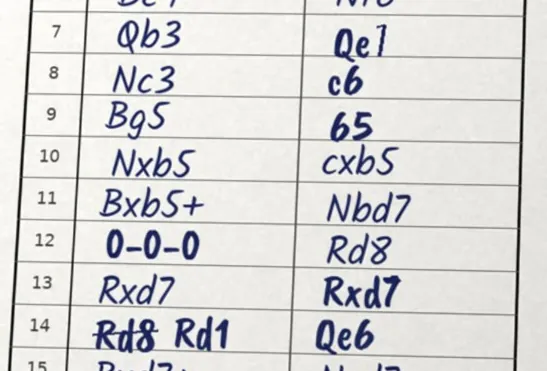
To examine how handwriting ambiguities are caught, we looked at a demo scoresheet we made ourselves using the 1858 Opera Game. We included deliberate visual ambiguities: 7...Qe7 written with a 7 that has almost no top bar (reading as illegal "Qe1"), 9...b5 with a short stem reading as "65", 14.Rd1 with a struck-through "Rd8", and castling written with zeros ("0-0-0").
When typed into the free PGN validator (which runs in the browser without an account), entering the literal misread "7... Qe1" reported "Illegal move at 7... Qe1" ("13 moves were legal before this one"), followed by a "LEGAL MOVES HERE" list that included Qe7, a "Position where it stopped" board with FEN, and "4 moves after the error were not checked". Literal "9... 65" was likewise flagged as illegal with b5 listed under legal candidates.
In our public test, the scanner read 141 of 143 moves right first time on 3 standard algebraic scoresheets (2 of them printed test sheets), and invented no moves on blank ones.
Reads board diagrams on web pages into FEN; scoresheets use the website.
Phones
Mobile browser
No native app; iPhone and Android users scan in the mobile browser.
Your account and credit balance are the same wherever you sign in: photograph a sheet in your phone's browser, then review and edit on your desktop.
Accepted image formats
Supported: JPG, PNG, and WebP (up to 15 MB per file, max 10 images per scan).
HEIC is not accepted: Apple devices shooting in HEIC must set camera capture to "Most Compatible" (JPEG) or export photos as JPG before uploading on web.
What it costs
ScanChess uses a clear credit system with no export fees. Scanning, editing, export and engine analysis work on every account; Pro and Pro+ add credits and the preparation and club tools (see the pricing page for the comparison, and ScanChess free vs Pro for what the difference means in practice):
Action
Credits
Scoresheet photo → PGN
2
Board photo → FEN
1
Move editing, board replay, PGN export, library history
Free
10 free credits upon signup (covers 5 complete scoresheets) with no credit card required.
Pro: 100 credits every 30 days for $4.99/month or $29.99/year.
Pro+: 500 credits every 30 days for $19.99/month or $119.99/year.
Referrals: Earn 5 credits for you and a friend when they register using your invite link.
Credits never expire: Unused credits carry forward every month and remain in your account even after canceling a subscription.
To avoid wasted credits, keep these platform boundaries in mind:
It is not an engine analysis tool: ScanChess transcribes ink into standard PGN. For computer evaluation, import your PGN into Game Analysis, Lichess, or Chess.com.
It does not process video: Recognition requires high-resolution still photographs.
It cannot reconstruct hidden text: Heavy shadows, paper folds, or fingers covering squares require a retake. Use our checklist on Photo to PGN and clean scan tips before uploading.
It does not convert descriptive notation: Old notation like P-K4 or N-KB3 displays as scanned text but cannot be validated by the engine. Transcribe old scoresheets to algebraic before scanning.
It requires Latin SAN: Piece letters must follow standard English algebraic notation (K, Q, R, B, N).
Ten free credits are included with every new account. Test your first scoresheets at ScanChess to verify recognition against your own handwriting.
Frequently asked questions
Do I need to install anything?
No. It runs in the browser at scanchess.com, on a phone as well as a computer. There is no app to install.
How much does a scan cost?
A scoresheet scan costs 2 credits and a board photo 1. New accounts get 10 credits free; Pro adds 100 every 30 days and Pro+ adds 500. See the pricing page.
Is my scoresheet image kept?
It is stored with the game in your library so you can check the original. Delete the game, or your account, and it goes with it.
10 free credits on sign-up. Volume pricing: Pricing