A chess PGN converter turns handwritten scoresheets or raw notation into standard Portable Game Notation (.pgn) that opens in any chess software. Instead of manually typing forty move pairs, you can upload scoresheet photos directly to the ScanChess converter or follow our guide to convert a chess scoresheet to PGN. The scanner digitizes handwriting, verifies moves against an internal board, and outputs a validated PGN ready for analysis.
How the converter turns scoresheets into PGN
Standard OCR fails on scoresheets because fast handwriting blurs notation (b versus 6, f versus t). ScanChess pairs vision recognition with chess-rule validation:
Upload: Photograph the scoresheet flat under even light (up to 10 images per game, 15 MB each) at /dashboard/scan.
Move-by-move verification: Each recognized move is played onto an internal board to verify legality.
In-line correction:
Red moves flag illegal moves (such as an impossible square or missing disambiguation).
Amber moves mark uncertain handwriting; clicking the move reveals legal candidate moves for that position to resolve the ply with one click.
The pencil icon edits any move, instantly re-validating subsequent moves while the scoresheet photo stays visible beside the board.
Export: Download the .pgn file or copy the text.
One Sheet, End to End: A Worked Example
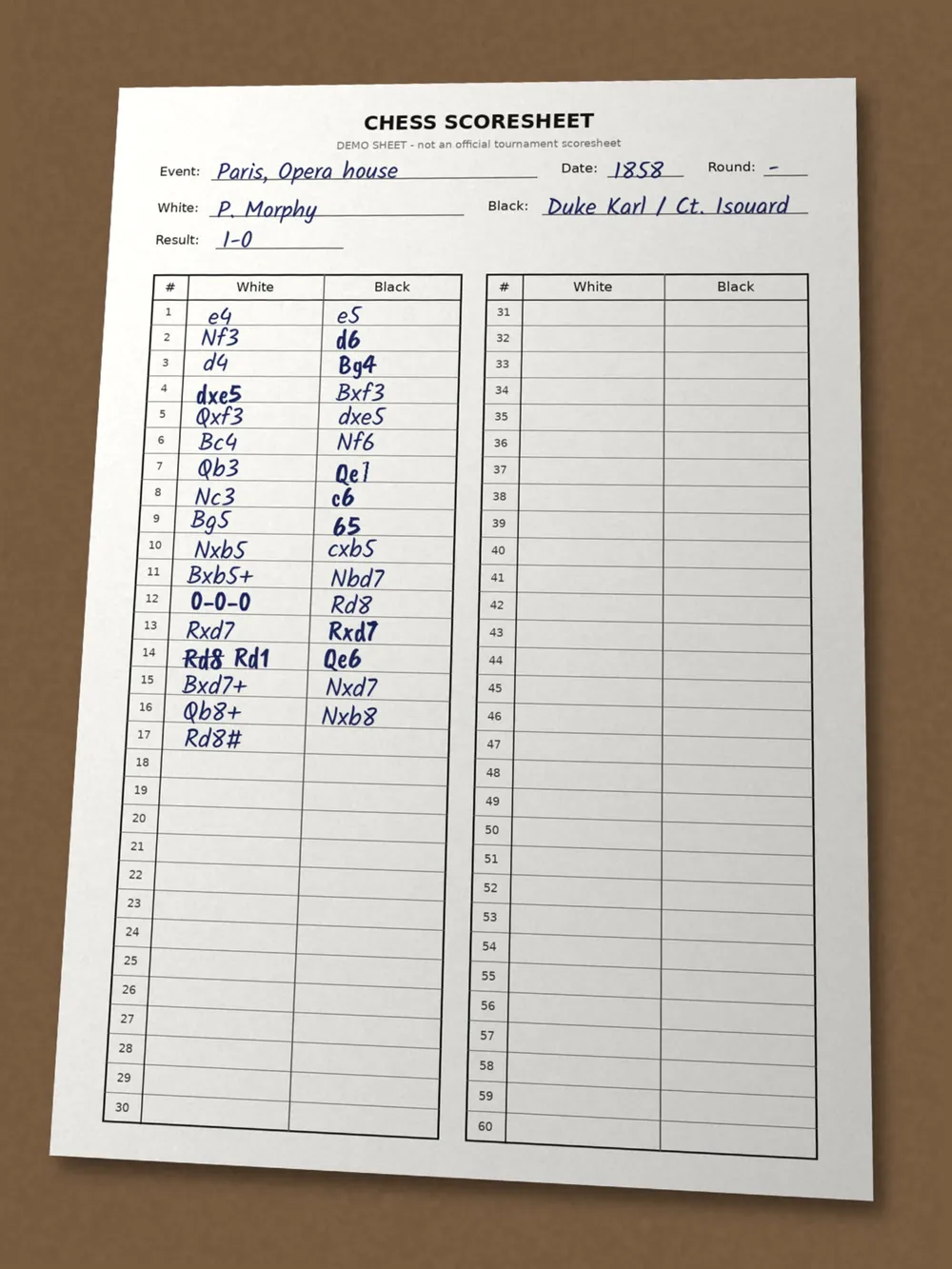
To test the pipeline from paper to analysis board, we used a demo scoresheet of the 1858 Opera Game that we filled in ourselves (Paul Morphy vs Duke Karl of Brunswick and Count Isouard) on a standard two-column 60-move sheet.
Our demo scoresheet of the 1858 Opera Game, created to test notation recognition workflows.
1. Upload and the Sign-In Gate
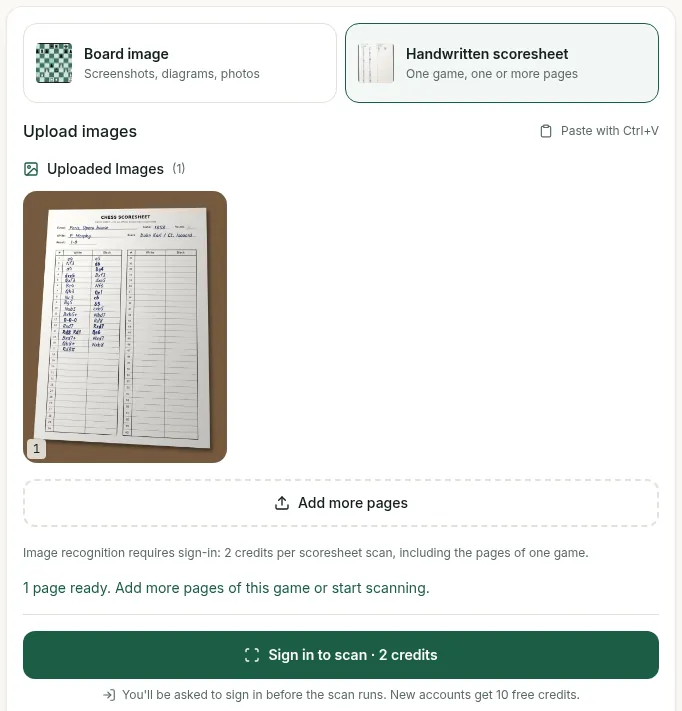
Uploading our scoresheet image at /dashboard/scan works while signed out: the upload page shows the file preview and reports "1 page ready". However, optical recognition does not run without an account. The action button reads "Sign in to scan · 2 credits", and the interface explains: "Image recognition requires sign-in: 2 credits per scoresheet scan, including the pages of one game." New accounts receive 10 free credits upon sign-up. Because we did not sign in during our test session, we could not run recognition on our demo sheet.
Uploading while signed out displays the scoresheet preview, but running recognition requires signing in for two credits.
2. Exploring the Free Review Screen Example
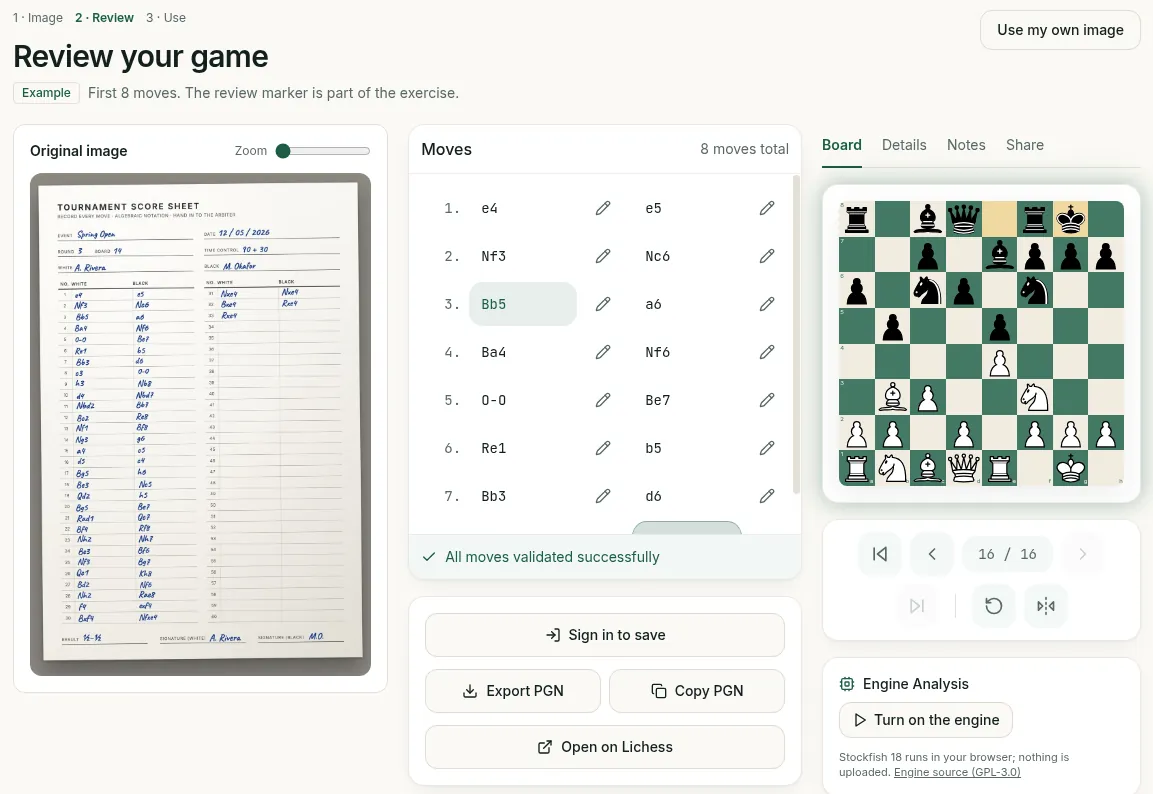
To inspect the review environment without spending credits or signing in, ScanChess provides a free preloaded Example. Opening this example loads the full Review screen:
Original Image: Displayed on the left for direct visual comparison.
Move List: Placed in the center, showing "8 moves total" ("First 8 moves") and the status "All moves validated successfully".
Interactive Board: Located on the right with tabs for Board, Details, Notes, and Share, plus an engine panel ("Turn on the engine", running Stockfish 18 in the browser).
Inline Editing: Each move has a pencil button. Clicking it turns the move into an editable text field with check and cross icons, alongside options to "Insert move" and "Delete".
The free preloaded example opens the review screen with the sheet on the left, moves in the center, and board on the right.
3. Exporting PGN and Header Tags
Clicking Export PGN on the preloaded example downloaded a file named A. Rivera_vs_M. Okafor_.pgn. The file carried the tags Event, Site, Date, White, Black and Result "*", plus ECO "C90" and Opening "Ruy Lopez: Closed". It had no Round tag, so it is not a full Seven Tag Roster; add [Round "?"] if a strict tool asks for it. Clicking Open on Lichess created an imported game on Lichess, which categorized the game as "Correspondence" and noted it was "still ongoing after 8 moves", because the example's result is * and it has no TimeControl tag.
4. Validating the Clean PGN
When the verified movetext of the complete 1858 Opera Game is assembled into standard PGN format:
We tested this PGN in the PGN validator. The validator confirmed: "All 33 moves are legal", identified "Result: 1-0", and supplied a cleaned seven-tag PGN ready for copy or download. The validator also notes that common scoresheet shorthands like 0-0, dc, and e8Q are normalized automatically.
5. Opening in Lichess and Chess.com
The validated PGN opens smoothly across external analysis platforms:
Lichess: Pasting the PGN into lichess.org/analysis loads all 33 plies immediately and jumps straight to the checkmate on move 17, with the local Stockfish toggle ready.
Chess.com: Pasting into the one-line box on chess.com/analysis works while signed out, loading player names and the full move list while keeping the board on the starting position for replay as Stockfish 19 Lite starts running.
What you get: Valid PGN output
The converter produces a standard .pgn file—plain text, readable by all modern chess software:
Every valid PGN has two parts separated by a mandatory blank line: the Seven Tag Roster header and the movetext in Standard Algebraic Notation (SAN). Leaving out this blank line is the most common reason external importers fail.
The Seven Tag Roster: Required tag order
The official PGN specification mandates seven header tags in this exact order:
[Event "..."] — Tournament or match name.
[Site "..."] — City and country code.
[Date "..."] — Start date formatted as YYYY.MM.DD (? for unknown digits).
[Round "..."] — Round number within the event.
[White "..."] — White player (Last, First or full name).
[Black "..."] — Black player.
[Result "..."] — Game outcome (1-0, 0-1, 1/2-1/2, or *).
Before exporting, fill in these fields while the sheet is in front of you. Missing metadata makes searching your database difficult later.
Where it opens
Destination
How
Lichess
Paste at lichess.org/paste, or load into a Study. Step by step
It is text. Email it, paste it in a forum, drop it in any folder
For engine evaluation, Lichess and Chess.com run Stockfish across the moves to flag tactical mistakes.
One file, many games: Multi-game PGN
A single .pgn file can hold multiple games separated by blank lines:
Lichess Studies: Importing under Community → Studies → Add a new chapter → PGN tab turns each game into a separate chapter. In contrast, pasting into lichess.org/paste or the Analysis board loads only the first game and ignores subsequent games.
ChessBase & SCID: Opening a multi-game file via File → Open indexes every game into a database.
ScanChess exports: Account settings allows exporting your entire scanned library as a single multi-game PGN archive.
When an import is rejected
If a chess program rejects your PGN, check these six common formatting errors:
Illegal or ambiguous move: A mistyped move (like Nb5 when unreachable, or Nd7 when two knights can move there) halts the parser. ScanChess catches these during recognition; you can also test files in our free PGN validator and inspect them in the PGN viewer.
Missing blank line: No empty line between tags and movetext.