
Short answer: photograph one diagram from a chess book you own in the board scanner and you get a FEN. Wrap that position as a PGN with the FEN to PGN converter. If the book prints the moves, type them and open PGN to FEN to see the position after any ply. ScanChess does not host book text and does not offer book downloads. The file is for your own study.
People looking for a "chess book scanner" or "chess book to PGN" usually have a book on the desk and one position, or one game, they want in a file. What ranks for that search today is a forum thread, because most sites either sell a database of master games or point at a copied PDF. Neither helps when the book is yours and you need the diagram on this page, or the game you just played through, in a form a PGN viewer can open.
A diagram and a printed game are different jobs
A chess book holds two kinds of chess, and they do not take the same path into a file.
A diagram is a picture of one position: a puzzle, a critical middlegame, an ending to remember. The useful result is a FEN, and from that a short PGN that starts at the diagram so you can add the moves you find.
A game is a list of moves, usually in algebraic notation, sometimes with a diagram every few moves. The useful result is a PGN of those moves. A photo of a whole page is a poor way to read small printed type. Typing the moves, then checking them, is faster and more accurate than asking a camera to read forty moves of small type. Handwritten notes in the margin are the other way round: that is what the scoresheet scanner is for.
A board image is read into a position. A scoresheet image is read into moves. You review the result, correct it, and keep the FEN or the PGN. The page is not stored as a page, and the book stays on your shelf.
Step 1: Photograph one diagram
Open the book flat. One diagram per photo. Crop close to the board so the caption and the next column stay out of the frame.
What works:
- A printed diagram, the book held open and flat, in even daylight. The gutter of a thick book throws a shadow across the spine side. Press the page, or shoot the diagram that sits away from the gutter.
- A puzzle diagram in a standard piece font. Stylized pieces, especially a dark bishop next to a dark pawn, are the usual misread.
- A photo of a real board you set up from the book, taken from directly above with the flash off.
What does not work well: a photo of a whole page of prose, an angled shot, or a diagram so small that each piece is a few pixels. Shoot the diagram, not the chapter.
Upload it at the chess board image to FEN scanner. One board image costs 1 credit. A new account includes 10 free credits, so the first ten diagrams are covered before you pay. The result opens on a board. Squares the reader was unsure of are marked. Drag a piece if a bishop was read as a pawn. A diagram does not record whose turn it is, so set the side to move, and set castling if the position is from the middle of a game. Chess board image to FEN covers the capture and the checks in more detail.
Step 2: Turn the diagram into a PGN
A FEN is one position. A PGN is a game. To keep a file that starts at the diagram, paste the FEN into the FEN to PGN converter. It writes a PGN with [SetUp "1"] and [FEN "..."], which is how a game that does not start from the opening array is stored. You can then play the continuation on the board — the line printed under the diagram, or moves you want to try — and those moves are written into the same PGN.
If the FEN is malformed, the converter says why: a rank that does not add up to eight squares, a missing side to move, two kings, a pawn on the first or eighth rank, or a king left in check. Fix the string, or go back to the board and correct the piece, before you copy the file.
Open the PGN in the PGN viewer to replay it. If a move you added will not play, the PGN validator stops on that move and lists the legal ones.
This is for a position you are studying from a book you own. It is not a way to look up a move in a game you are playing.
Step 3: A printed game, or notes you wrote in the book
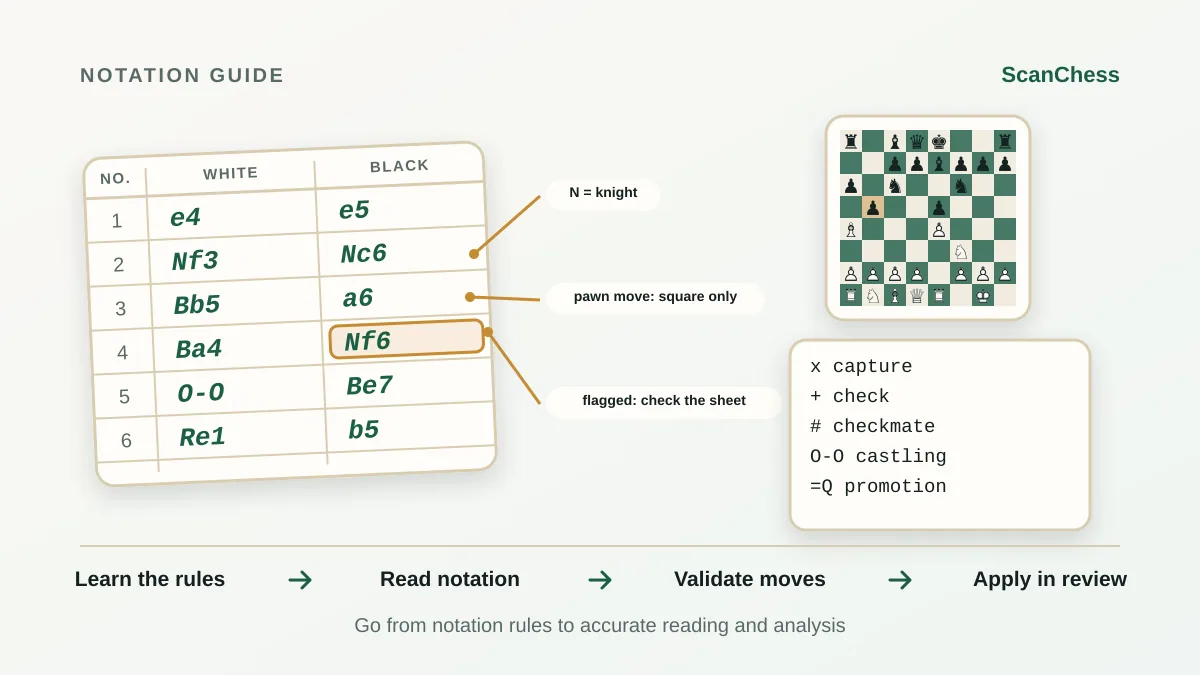
Printed moves. Type them. Paste the move list into PGN to FEN. The tool replays every ply in the browser and shows the FEN after each one, so you can stop at the diagram in the book and compare. If a move is illegal it stops there and names the move. That is usually a typo, Nf6 where the book has Nf3, not a defect in the book. Copy the FEN at that ply, or copy the FEN of every ply as a list. The PGN validator lists the legal moves at the point it stopped.
Handwritten notes. If you recorded a game in the margin, or you are copying from a scoresheet kept in the book, photograph that writing and use the scoresheet scanner. It reads algebraic handwriting, replays each move, and flags moves that are illegal or uncertain. It does not read descriptive notation such as P-K4. Scan chess notation explains the colors on the review.
A diagram partway through a printed game. Scan the diagram for the position, then type only the moves that follow it. You do not have to retype the whole game to study the ending. The FEN to PGN file starts at that diagram; the moves you add are numbered from the diagram's move number.
What this is not
ScanChess is not a library of chess books, and it does not offer downloads of them. Do not photograph a book in order to republish it, to avoid buying it, or to hand the pages to someone else. A FEN of a position you are studying, and a PGN of a game you played through for yourself, are personal notes. The prose around those games, the author's analysis, and the arrangement of the book are not yours to copy.
The moves of a tournament game are a record of what was played. A scoresheet you filled in is yours. The text of a modern book is not. Keep the file you export, and leave the pages in the book.
Check the file before you trust it
A scanned diagram can swap two similar pieces. A typed game can drop a move. Before you rely on the file:
- Compare the board with the diagram, square by square when the position is crowded.
- Step through the PGN in the PGN viewer. The position should match the next diagram in the book.
- If it diverges, the error is at or just before the first position that does not match. Fix that move. Do not edit the end of the game and hope the middle comes right.
When the file matches the book, you have a PGN you can replay, turn back into a position with PGN to FEN, or keep beside your own notes.
Related
- Chess board image to FEN — screenshots, diagrams and photos of a board
- FEN to PGN converter — a position into a PGN with a SetUp header
- PGN to FEN converter — the FEN after any move of a game
- PGN viewer and PGN validator
- What is FEN? and What is PGN?