
Short answer: there is no single Chessvision.ai replacement, because Chessvision.ai does several jobs. Pick by what you are scanning:
- A screenshot or 2D diagram: ChessboardScan, or the free ScanChess best move finder. Both work in the browser without an account.
- A chess book you own (PDF or ePub): GreyChess, or the desktop app ChessPDFBrowser.
- A handwritten scoresheet: ScanChess, Zugwise, InkPGN or Score Sheet Scanner.
- A photo of a real board: the ScanChess board scanner.
Most people who search for a Chessvision.ai alternative already like the idea: point something at chess and get a position back. What they need is a tool that reads a different object, costs less, or works on a different device. This page sorts the options by that object. If you only want Chessvision.ai and ScanChess side by side, read Chessvision.ai vs ScanChess instead.
What you are replacing
Chessvision.ai recognizes rendered 2D boards, such as a diagram in a PDF, a frame of a video or a screenshot, and opens the position for analysis. Its own plans page says browser-extension scans are free and unlimited, mobile-app scans are limited for free users, and a Membership makes them unlimited. The eBook Reader is a separate subscription, and on the free tier you can use diagrams only on the first several pages of each book. Prices are shown where you subscribe. It does not read handwriting. We cover the details, with sources, in our head-to-head comparison.
So the honest question is which of those jobs you need done some other way.
Screenshots and 2D diagrams
ChessboardScan is a focused image-to-FEN web tool. You paste or upload a PNG, JPEG or WebP image of up to 15 MB, check the editable board and FEN, and open the position in Lichess. It needs no account. Its own page says it has no extension, no PDF reader and no video tools, and that it is meant for flat 2D boards rather than photographs of real sets.
ScanChess best move finder reads a screenshot in your browser, with no account and no credits, and gives you the position with Stockfish running in the page. Use it to study positions from finished games, puzzles and books. ScanChess does not help with games in progress.
Chess books you own
GreyChess is built around ebooks. You open a PDF or ePub, and each diagram becomes a live board beside the page, with the moves the book prints after it. You need an account (Google, Lichess or an email link). The Free plan allows 30 board scans a day, and Pro is $5 a month or $50 a year for 1,000 a day. Stockfish 18 runs in your browser. According to its own page, only numbers derived from the diagram are sent to its server, never the page itself. It does not open DjVu, which Chessvision.ai does.
ChessPDFBrowser is a desktop application, downloadable from SourceForge (Java, for Windows, Mac and Linux) that extracts whole games from PDF chess books into PGN. It reads both algebraic and figurine notation, and it includes a command-line pdf2pgn tool. Scanned PDFs need an external OCR step, and extraction quality depends on it.
ScanChess reads one diagram at a time from a book you own: photograph it, get a FEN, and keep it for your own study. See chess book to PGN. It does not download or host books.
Handwritten scoresheets
This is the job Chessvision.ai does not do at all, and it is where most of the alternatives differ.
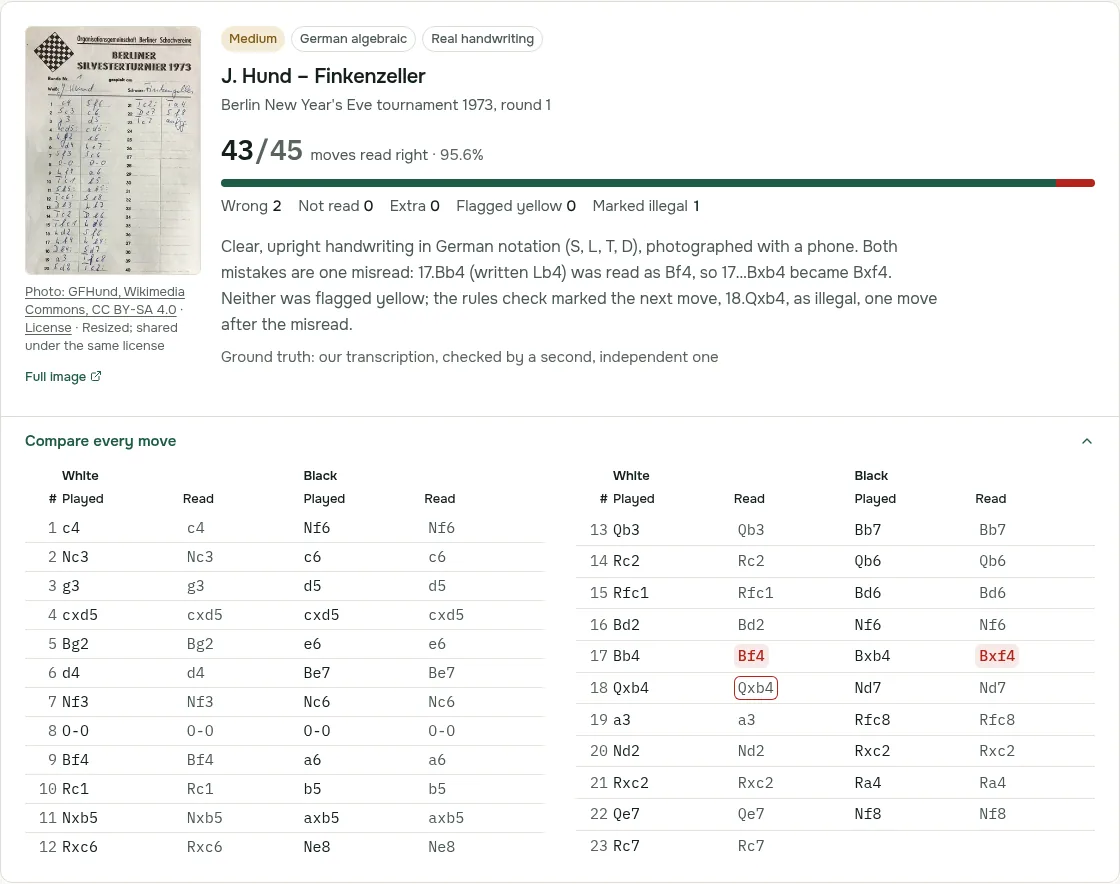
ScanChess reads the pages of one game, checks every move against the rules, and shows the moves beside your photo so you can fix a doubtful one before you export the PGN. Descriptive notation (P-K4) is not supported. A scan costs 2 credits however many pages the game has, and a new account gets 10 free credits, which is five scoresheets. We publish our accuracy test move by move. In the 16 October 2026 run, the scanner read 181 of 204 moves right first time on four standard algebraic scoresheets and 43 of 45 on a clean, real 1973 tournament sheet, and invented no moves on blank sheets. See the accuracy test.
Zugwise is free and open source and runs entirely in your browser, so photos never leave your device. It uses an OCR model trained on the HCS handwritten scoresheet dataset, together with engine-checked game reconstruction, and its site lists batch processing for tournament directors.
InkPGN is free (20 sheets a day per connection, according to its FAQ), needs no account and handles a game spread over two pages. Moves that the position cannot play are flagged instead of guessed. Its own page says photos are sent to Google's Gemini API to read the handwriting and that untouched sheets are deleted after 90 days. It does not support descriptive notation.
Score Sheet Scanner (scoresheet.cam) imports photos or PDFs, supports 23 languages with automatic notation detection, and can combine White's and Black's sheets of the same game. It is an app with yearly plans from €4.99 to €19.99 and a free trial.
Photos of a real board
Most diagram readers, ChessboardScan included, say they are meant for flat 2D boards. The ScanChess board scanner is tuned for photographs of physical sets, with odd angles, pieces hiding other pieces and hall lighting. It returns the squares it is unsure about instead of guessing, and costs 1 credit per board.
Side by side
| Tool | Reads | Gives you | Price model | Account | Platform |
|---|---|---|---|---|---|
| ChessboardScan | 2D screenshots, diagrams | FEN, Lichess link | Free | No | Web |
| ScanChess best move finder | Screenshots | Position + Stockfish | Free | No | Web |
| GreyChess | PDF, ePub books | Live board per diagram | Free (30 scans/day); Pro $5/month or $50/year | Yes | Web |
| ChessPDFBrowser | PDF books (text games) | PGN | Download from SourceForge | No | Desktop (Java) |
| ScanChess | Scoresheets, board photos, book diagrams | PGN, FEN | 10 free credits; Pro $4.99/month or $29.99/year | Yes, for scans | Web, Chrome/Edge extension |
| Zugwise | Handwritten scoresheets | PGN | Free, open source | No | Web (runs locally) |
| InkPGN | Handwritten scoresheets | PGN with your comments | Free, 20 sheets a day | No | Web |
| Score Sheet Scanner | Scoresheet photos and PDFs | PGN | Free trial; €4.99–€19.99 a year | No sign-up required | App |
What we left out
We did not include tools that draw engine moves onto a live Chess.com or Lichess board, or that read the position of a game you are playing. Using an engine during a rated game breaks the Fair Play rules of every major site. Everything on this page is for games that have already finished, for puzzles and for books.
Questions
Is there a free alternative to Chessvision.ai? Yes. ChessboardScan and the ScanChess best move finder read screenshots for free without an account. Zugwise reads handwritten scoresheets for free. InkPGN is free for up to 20 sheets a day.
What is the best way to scan a chess book? For a whole ebook, GreyChess or the Chessvision.ai eBook Reader. For one diagram from a printed book you own, photograph it and use the ScanChess board scanner.
Can any app read a handwritten chess scoresheet? Yes: ScanChess, Zugwise, InkPGN and Score Sheet Scanner all do. Chessvision.ai does not. Whichever you use, check the moves against your photo. Most wrong reads are confident ones, as our accuracy test shows.
Can I turn a photo of a real chessboard into a FEN? Yes, with a scanner made for photographs of physical sets, such as ScanChess. Many diagram readers say they are designed only for flat 2D images.
Is Chessvision.ai free? Partly. Its browser extension scans for free without a limit, the mobile app has limited free scans, and both a Membership and a separate eBook Reader subscription unlock more.
If what is piling up is paper, scan a scoresheet with ScanChess. Your first five games are free.