
Search for chess vision and you get two different things. One is the human skill — seeing the board in your head, calculating a line without moving the pieces, spotting that the knight on f3 is loose three moves before it matters. The other is a category of software: computer vision that looks at a picture of chess and hands you notation back.
This article is about the second kind, and specifically about the two tools people most often end up comparing: Chessvision.ai and ScanChess. They look similar from a distance — point something at chess, get a machine-readable answer — but they read different objects, and that difference decides which one belongs on your phone.
The question that settles it
Before comparing features, answer this: what are you photographing?
- A diagram — a puzzle in a PDF, a position in a YouTube video, a screenshot from a forum post, a board printed in a book. That is one position, and the answer you want is a FEN.
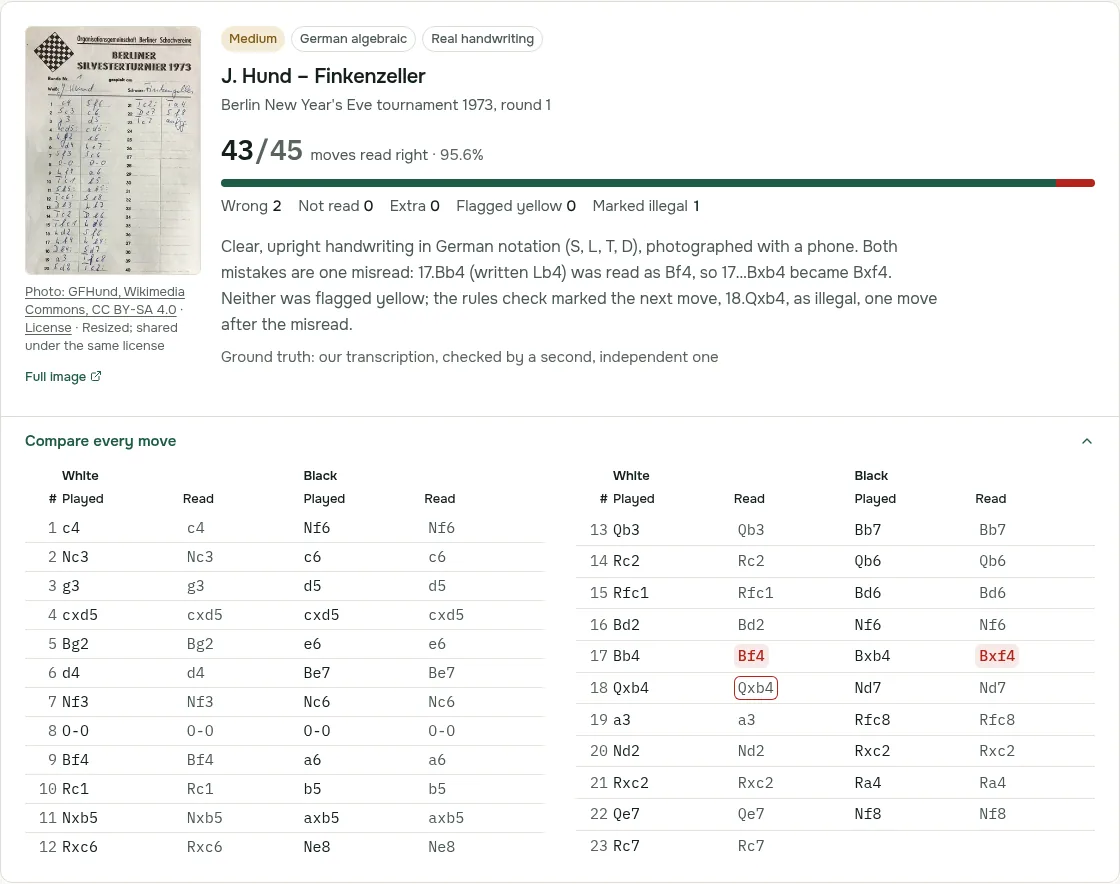
- A scoresheet — the paper you filled in by hand during a tournament game, forty moves of your own handwriting in two columns. That is a whole game, and the answer you want is a PGN.
Chessvision.ai is built for the first. ScanChess is built for the second. Everything below follows from that.
What Chessvision.ai does
Chessvision.ai is a family of apps built around one core: recognizing a two-dimensional chess diagram and turning it into a position you can analyze. At the time of writing, the Chrome listing reports more than 100,000 users and a 4.5 rating from 774 reviews, which makes it comfortably the best-known tool in this space.
The lineup, as of October 2026:
- Browser extension for Chrome, Firefox and Safari. Click the icon, scan the page, and the position opens in a Lichess or Chess.com analysis board. A Select area mode lets you pick which board to scan when a page shows several, and there is turn detection from last-move highlights, board rotation, FEN copying and a diagram editor.
- Mobile scanner app for iOS and Android, described in its own store listing as scanning "chess positions from prints and 2d sources" — a book page, a magazine, a screen.
- eBook Reader, which processes PDF chess books so you can double-click any diagram in the book to open it for analysis. This is a separate subscription from the main membership.
- Library at my.chessvision.ai for saving scanned diagrams, building opening repertoires and training with flashcards.
- Video features — matching a scanned position against YouTube content so you can watch a strong player explain the exact position you are looking at, plus a Board Explorer for stepping through video analysis.
- Odds and ends: Twitter, Telegram, Discord and Reddit bots that reply to posted diagrams, and small utilities like FEN-to-image and PGN-to-PDF.
Pricing. Chessvision.ai's own plans table is clear on the point most people get wrong: browser-extension scans are free and unlimited, with or without a membership. The limit sits in the mobile app, whose free tier allows a limited number of scans; when they run out you wait roughly 24 hours or subscribe. The membership, an in-app purchase at $5.99/month or $45.99/year, makes app scans unlimited and lifts the caps on Library studies, flashcards and YouTube video results. The eBook Reader is billed separately, and its free tier only lets you interact with diagrams on the first few pages of each book.
What it does not do. Nothing in Chessvision.ai's documentation covers handwritten notation. It reads printed and rendered boards, not your pencil. There is no scoresheet-to-PGN path.
What ScanChess does
ScanChess starts one step earlier in the paper trail: the sheet the arbiter collects at the end of the round.
- Scoresheet to PGN. Photograph a completed scoresheet — up to 10 images per game, JPG, PNG or WebP, 15 MB each — and get back a full PGN with headers. A scan costs 2 credits regardless of how many pages you attached, so a game that spilled onto a second sheet is not charged twice. Recognition is algebraic notation only; descriptive notation (P-K4) is neither converted nor checked.
- Move validation, not just transcription. Every recognized move is replayed against the rules of chess. When move 23 cannot be legal from the position that move 22 produced, the move is flagged for you to fix rather than exported as a broken game — which is the part that matters, because a scoresheet has real handwriting in it: crossed-out moves, a skipped line, a
Nf3that could beNf5. How ScanChess reads unclear moves explains what the review asks you, and the scoresheet scan accuracy page publishes every move of the sheets we tested, misreads included. - Board photo to FEN, at 1 credit. This overlaps with Chessvision.ai, with one difference worth knowing: ScanChess is tuned for photographs of physical sets, so it handles occlusion, odd piece designs and camera angles, and it deliberately refuses to guess what a photo cannot show. It will not invent castling rights when the rook has clearly moved, and it returns a list of squares it is unsure about instead of an over-confident wrong board. The chess board scanner page covers photos of a real set, and chess board image to FEN covers screenshots and printed diagrams.
- In-browser engine. Stockfish runs locally in the page, so any scanned game or position can be analyzed without another subscription and without sending the position anywhere.
- Study tools for your own games: Stockfish review of every game, an AI coach that explains the turning points (one explanation a day free), and daily practice built from your own mistakes. Pro adds the full insights profile, opening repertoires that flag where a game left your preparation, and opponent scouting.
- Free tools with no account: more than twenty of them, including a PGN viewer, an analysis board, a best move finder that reads screenshots in your browser, and a printable scoresheet generator.
- Platforms: the website, with the interface in eight languages, and a browser extension for Chrome and Edge that reads board diagrams on web pages. There is no mobile app.
Pricing. Credits, not scans-per-day. You get 10 credits on sign-up (five scoresheets) plus 5 per referral; Pro is $4.99/month or $29.99/year for 100 credits every 30 days; Pro+ is $19.99/month or $119.99/year for 500. Credits never expire and survive cancellation. Pro also unlocks the preparation tools above, Pro+ adds shareable event reports, and a club workspace on its own Pro+ also keeps a player roster with student pages. Prices are in US dollars. See free vs Pro for where the line actually falls.
Side by side
| Chessvision.ai | ScanChess | |
|---|---|---|
| Primary input | Rendered 2D diagrams: screens, PDFs, books, video frames | Handwritten scoresheets; photos of physical boards |
| Primary output | FEN — one position | PGN — a complete game |
| Handwriting recognition | No | Yes (algebraic notation) |
| Multi-page games | Not applicable | Up to 10 images, 2 credits total |
| Rule-legality checking | Not a stated feature | Every move validated against the position before it |
| Browser extension | Chrome, Firefox, Safari; free, unlimited scans | Chrome & Edge (board diagrams on web pages); account required, 1 credit per board |
| Mobile | iOS and Android | Mobile browser; no app |
| PDF chess books | Yes (eBook Reader, separate subscription) | No |
| Video matching / YouTube | Yes | No |
| Repertoire & flashcards | Yes (Library) | Yes (Pro): opening repertoires, plus daily practice from your own mistakes |
| Engine analysis | Opens on Lichess or Chess.com | Stockfish in the page, plus Lichess links |
| Billing model | Free extension; subscription for unlimited app scans and Library | Credits, no monthly ceiling on what you keep |
| Headline price | $5.99/month or $45.99/year | $4.99/month or $29.99/year (Pro) |
| Free tier | Unlimited extension scans; limited app scans, reset after about 24 hours | 10 credits, engine analysis, one AI explanation and 15 practice positions a day, no watermark |
Which one to use
Use Chessvision.ai if you study from screens. You read chess books as PDFs, you watch a lot of YouTube, you want to grab a puzzle out of a forum post and throw it at an engine without setting the pieces up by hand. The video matching in particular has no equivalent anywhere else, and for a working chess student it is the feature that justifies the subscription.
Use ScanChess if you play over the board. Your problem is not a diagram on a screen; it is a stack of paper in a tournament bag, each sheet a game nobody will ever analyze because typing forty moves into an import box is thirty minutes you would rather spend playing. That is what the scanner is for, and from the resulting PGN you can go straight to Lichess or Chess.com.
Use both if you do both, and most improving players do. They are not really competitors so much as two ends of the same pipeline: one reads chess that was already digital and got flattened into a picture, the other reads chess that was never digital at all.
One honest note about the overlap. For the odd position off a screenshot, Chessvision.ai has the edge: its extension scans for free, without a limit, in Chrome, Firefox and Safari. The ScanChess browser extension for Chrome and Edge needs a ScanChess account and uses 1 credit per board. If all you want is a screenshot read for free, the ScanChess best move finder reads it right in your browser, with no account and no credits. Where ScanChess earns the credit is the photo of a real board mid-game, where pieces block each other and the lighting is whatever the tournament hall gave you.
If neither fits, we keep a roundup of every chessvision ai alternative, sorted by what you scan.
If your paper is piling up faster than you can type it, scan a sheet with ScanChess and see what comes back — the first five are on the house.