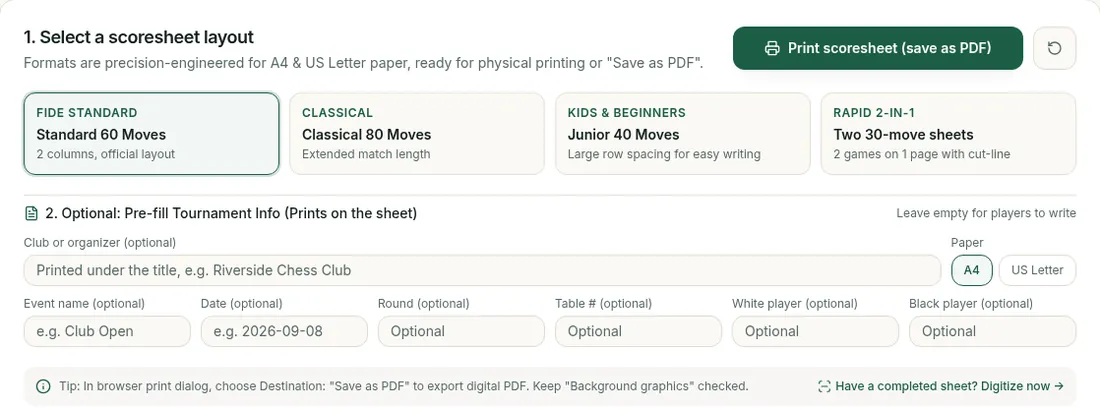

To print a tournament-ready chess score sheet immediately as a PDF, open the free printable score sheet generator, select your layout—"Standard 60 Moves" for official club play, "Classical 80 Moves" for extended match length, "Junior 40 Moves" with large rows for kids and beginners, or "Rapid 2-in-1" for two 30-move games on one page with a cut-line—and select Print scoresheet (save as PDF). Setting your browser destination to Save as PDF produces a clean vector document calibrated for A4 and US Letter without registering an account.
Tournament organizers stocking club nights, arbiters running rated opens, and players archiving games need reliable score sheets. A badly laid-out sheet creates immediate problems: running out of rows in a 70-move endgame, boxes too cramped for junior handwriting, or margins that spill onto a second sheet. Below are the physical layout specifications, printing guidelines, and steps to record and digitize your games. Once the sheet is printed, how to fill out a chess scoresheet covers what to write in each box.
Which Score Sheet Layout to Use
The generator provides four layouts engineered to fit entirely onto a single printed page:
| Layout | Move Capacity | Grid Structure | Row Height | Margins & Paper | Recommended Use |
|---|---|---|---|---|---|
| Standard 60 | 60 moves | 2 cols × 30 rows | 24 px (~6.35 mm) | 6 mm vert / 8 mm horiz (A4 / Letter) | Weekend Swiss opens, rated club games, league matches |
| Classical 80 | 80 moves | 2 cols × 40 rows | 18 px (~4.76 mm) | 6 mm vert / 8 mm horiz (A4 / Letter) | FIDE classical championships, long endgames, 90+ min controls |
| Junior 40 | 40 moves | 2 cols × 20 rows | 34 px (~9.0 mm) | 6 mm vert / 8 mm horiz (A4 / Letter) | Scholastic events, youth clubs, kids writing with pencils |
| Rapid 2-in-1 | 2 × 30 moves | 2 stacked 15-row blocks | 22 px (~5.8 mm) | 6 mm vert / 8 mm horiz (A4 / Letter) | Rapid events (15–25 min), club nights, paper saving |
Standard 60-Move Sheet                      Rapid 2-in-1 Sheet (Cut Line)
+--------------------------------------+   +--------------------------------------+
| EVENT: ________  RD: __  DATE: _____ |   | GAME 1: RD __  WHITE: ___  BLACK: ___|
| WHITE: _________  BLACK: ___________ |   | 1. e4 e5 ... 15. | 16. ... 30.       |
|----+------------+----+---------------|   | RESULT: 1-0 / 0-1 / ½-½  SIGN: ______ |
| 1  | e4  | e5   | 31 | Rxe5  | fxe5  |   |- - - - - - - - [ Cut Here ] - - - - -|
| 2  | Nf3 | Nc6  | 32 | Qd3   | Kf7   |   | GAME 2: RD __  WHITE: ___  BLACK: ___|
| ...| ... | ...  | ...| ...   | ...   |   | 1. d4 Nf6 ... 15.| 16. ... 30.       |
| 30 | Rd1 | Qe7  | 60 | ...   | ...   |   | RESULT: 1-0 / 0-1 / ½-½  SIGN: ______ |
+--------------------------------------+   +--------------------------------------+
| RESULT: [ 1-0 ] [ 0-1 ] [ ½-½ ] SIGN |   (Yields two standalone rapid sheets)
+--------------------------------------+
60 moves: the standard tournament sheet
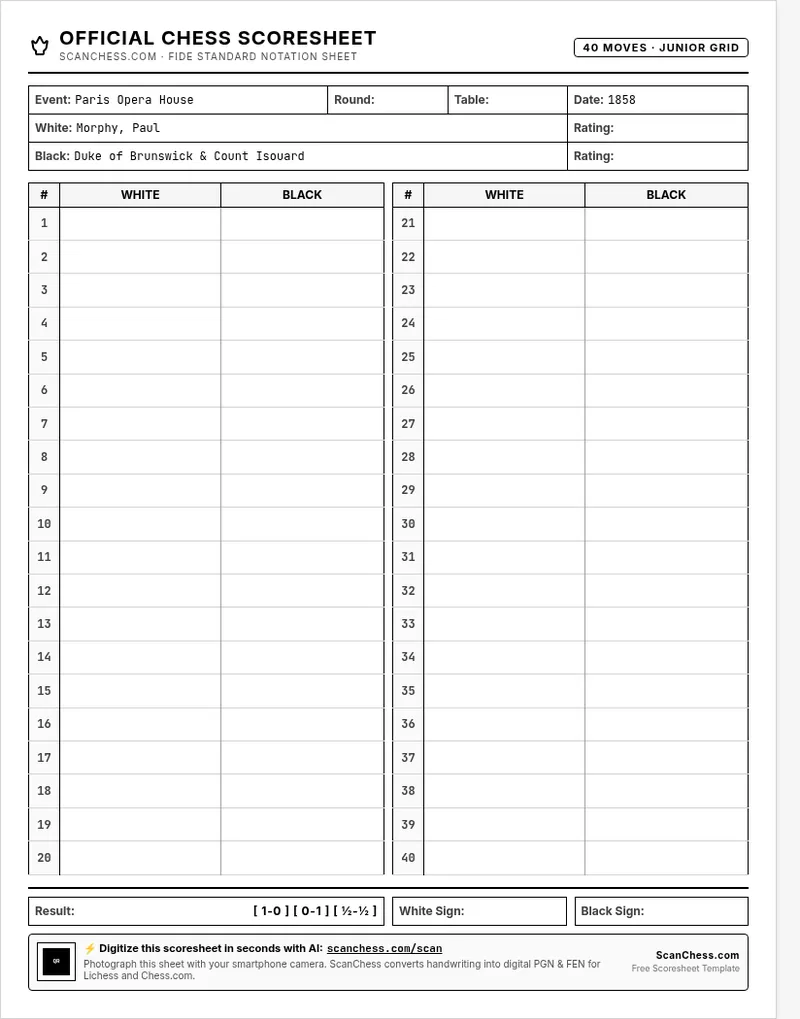
The Standard 60 Moves layout (labeled FIDE STANDARD, "2 columns, official layout") features two columns of 30 numbered rows, each row split into White and Black boxes. Sixty moves fits most games and longer games need the 80-move layout or a second sheet, while preserving a 24 px (~6.35 mm) row height for legible ballpoint handwriting. The header includes event, round, table (board), date, player names, and ratings, while the footer provides checkbox result options (1-0, 0-1, ½-½), signature lines, and a QR code.
80 moves: for long classical games
The Classical 80 Moves layout ("Extended match length") fits two 40-row columns on one page by reducing row height to 18 px (~4.76 mm) and condensing header padding. Classical time controls with increments (such as 90 minutes plus 30 seconds per move) frequently produce theoretical endings extending past move 60 (14.5% of classical games do, by the counts in how long is a chess game), and this layout keeps long games on a single physical sheet, eliminating loose continuation pages that arbiters can misplace.
40 moves with large rows: for kids and beginners
The Junior 40 Moves layout (labeled KIDS & BEGINNERS, "Large row spacing for easy writing") is designed for young scholastic players writing with pencils. This template provides 40 moves across two columns of 20 rows with an expanded 34 px (~9.0 mm) row height and a 32 px move-number column, headed by "40 MOVES · JUNIOR GRID". The generous spacing prevents notation from overlapping neighboring lines or spilling into adjacent columns. For beginner classes learning notation, pair this with our guide on how to read a chess scoresheet. When the filled sheets come home, saving your child's chess games shows parents how to turn them into a PGN.
Two rapid games on one page
The Rapid 2-in-1 layout ("Two 30-move sheets", "2 games on 1 page with cut-line") prints two independent 30-move scoresheets on one side of paper, divided by a central dashed cut line (- - - Cut Here - - -). A 15-minute or 25-minute rapid game rarely needs a full page, and each section retains its own event header, move grid, result boxes, and signature line, cutting paper consumption in half for multi-round club nights.
What Goes in the Header and Footer
Fill in the header before starting your clock:
- Event & Date: Identifies the tournament and filing date.
- Round & Table: Matches the pairing sheet so arbiters can verify board assignments.
- White & Black Names: Clarifies colors and includes current ratings.
- Result & Signatures: Under Article 8.7 of the FIDE Laws of Chess, both players must sign both scoresheets after recording the agreed result (
1-0,0-1, or½-½). Signing confirms the official outcome.
Organizer Tip: In the printable score sheet generator, type the event name, date, round, table number, club or organizer, and player names into the optional pre-fill fields to render them into every sheet, leaving blank lines only where needed.
Club & Tournament Printing: Paper and Printer Settings
When printing batches for a tournament or club supply:
- Paper stock (80 gsm minimum): Standard 80 gsm copy paper (or 20–24 lb bond for US Letter) is strongly recommended over thin 70 gsm paper. Ballpoint pressure and gel pens easily bleed through lightweight paper, which obscures the reverse side and interferes with arbiter review or camera scanning.
- Background graphics and monochrome laser printers: The generator uses subtle shaded fills for column headers. On sharp laser printers or when exporting to PDF, keep Background graphics enabled. On economy monochrome laser printers where toner-save dithering prints dark, speckled gray bars, uncheck Background graphics to print pure white cells with crisp black borders, ensuring high contrast for handwriting and automated OCR.
- Margins and scaling: The template embeds
@pageprint styles with 6 mm vertical and 8 mm horizontal margins. Set browser print margins to Default or None and scale to 100%. Adding manual browser margins can push the signature footer onto an unwanted second page.
How to Print a Score Sheet as a PDF
- Open the printable score sheet generator and click your preferred layout.
- Choose A4 (210 × 297 mm) or US Letter (8.5 × 11 in).
- Optionally enter club or organizer, event name, date, round, table number, and player names in the pre-fill fields to update the live preview.
- Click Print scoresheet (save as PDF) (or press Ctrl+P / Cmd+P).
- In the destination dropdown, select Save as PDF to archive the digital file (keeping Background graphics checked), or select your physical printer.